Top Recruitment Email Templates: 7 Resources for 2026
Find the best recruitment email templates for outreach, interviews, offers, and rejections. Our 2026 guide covers 7 top resources to help you hire faster.
Stop Sending Recruiting Emails Into a Black Hole
You’ve found the perfect candidate. You write a thoughtful note, mention the project that made them stand out, and hit send. Then nothing happens. No reply, no signal, no clue whether they ignored it or never saw it.
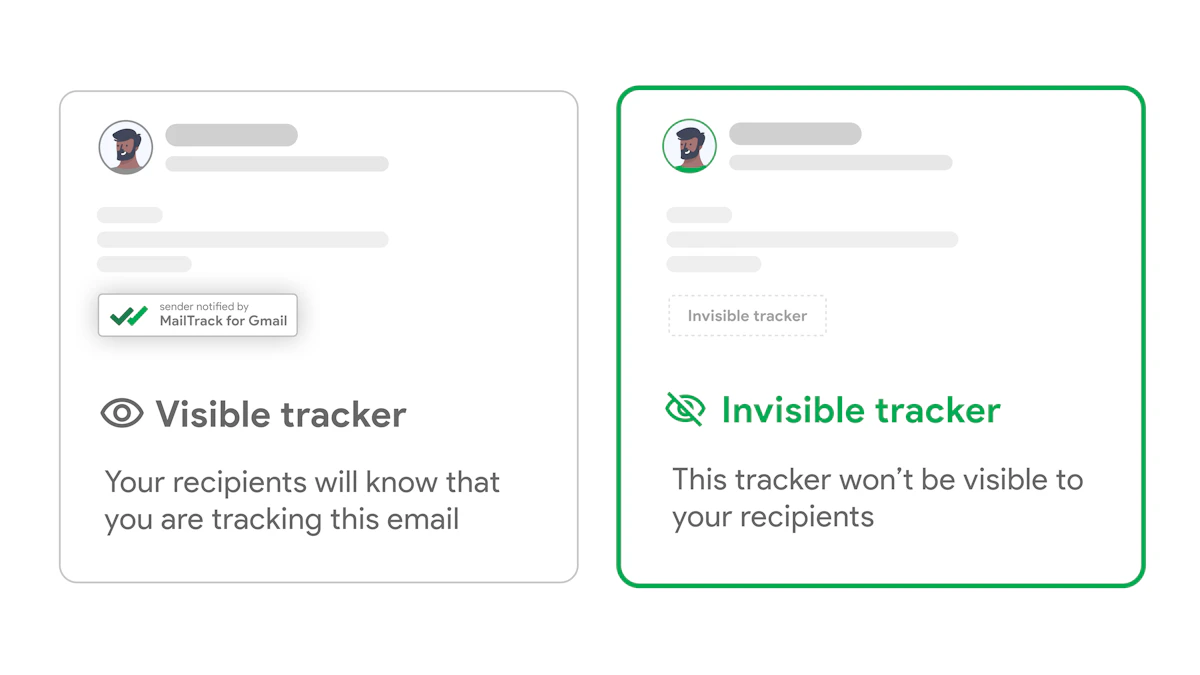
That’s the frustrating part of recruiting by email. Templates save time, but templates alone don’t solve the core problem. You still need timing. You still need visibility. You still need to know when a candidate opened your message so your follow-up lands when the conversation is warm, not a week too late. That’s why strong recruitment email templates work best when paired with tracking inside Gmail.
The practical playbook is simple. Start with template libraries that give you solid wording for outreach, follow-up, interview scheduling, and offers. Then layer on a Gmail tool that tells you when someone engages. If you’re also refining broader outreach, these strategies to attract top engineering talent are worth adding to your sourcing mix.
1. Mail Tracker for Gmail

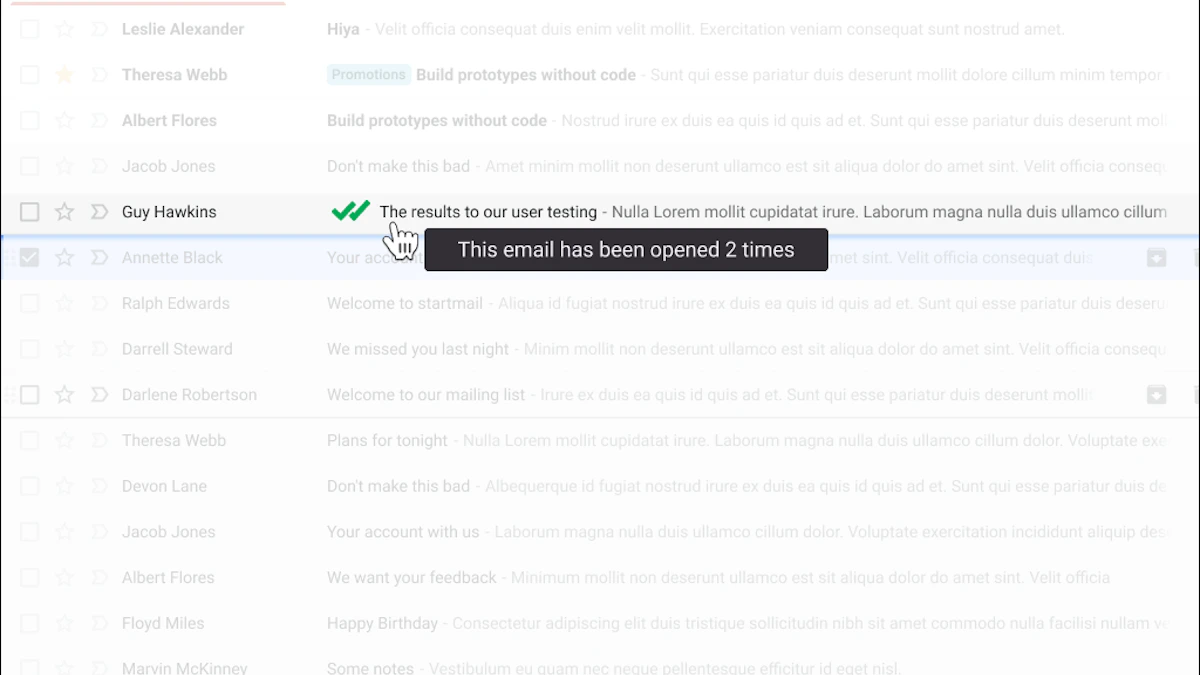
A candidate opens your outreach at 8:12 a.m., rereads it at lunch, and still hasn’t replied by mid-afternoon. Without tracking, that activity stays invisible. With Mail Tracker for Gmail, you can see the signal and time your follow-up while your note is still fresh.
That’s why this tool belongs at the top of a guide about recruitment email templates. The templates give you the wording. Mail Tracker for Gmail gives you the timing. If your team already works from Gmail, that combination is practical because you can write, send, monitor, and follow up from the same place instead of bouncing between systems.
Why it fits recruiting workflows
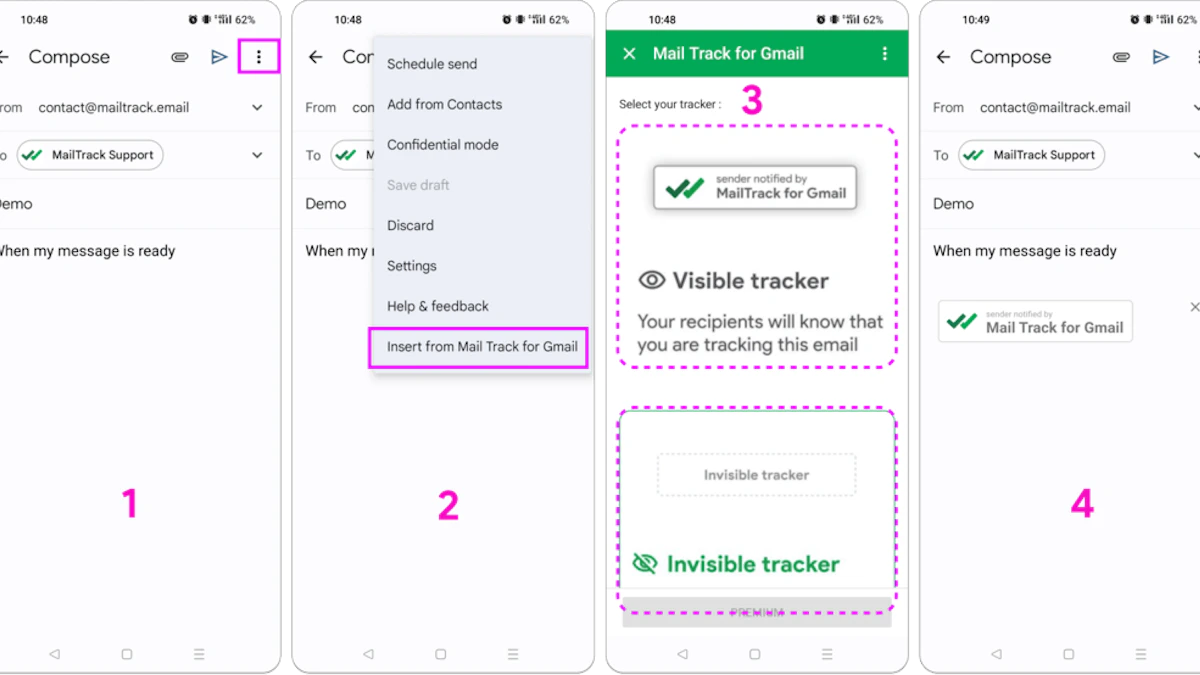
The Google Workspace Marketplace listing for Mail Tracker for Gmail says it offers a free and unlimited plan, works on iOS and Android Gmail apps, and doesn’t require sign-up for basic tracking functionality. For recruiters, that means you can test it on live outreach without changing your process first.
The tracking works through a transparent 1x1 image in the email body that logs opens, timestamps, open counts, and device type without reading the email itself. For recruiting, that’s a reasonable trade-off. You get engagement data that helps with follow-up timing, but you are not analyzing candidate message content.
Practical rule: Use tracking to improve timing, not to excuse weak outreach.
It’s also important to separate the product from the category name. “Mail Tracker for Gmail” describes a broad type of tool, but this specific product is built to run inside Gmail and show activity in the inbox where recruiters already spend the day. For setup details and a clearer explanation of how open tracking works, see this email tracking for Gmail guide.
Where it helps most
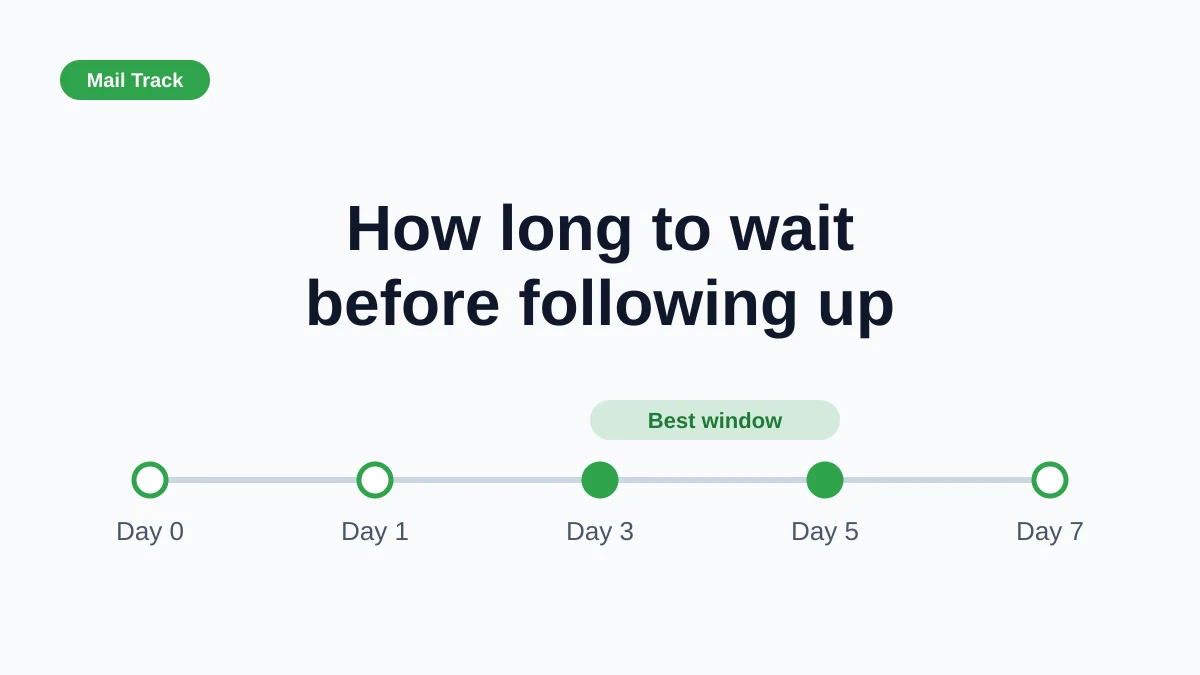
Mail tracking is most useful after the first send. A candidate who never opened your email needs a different follow-up than a candidate who opened it twice this morning. That is the operational advantage. You stop treating every non-response the same way.
Useful strengths and trade-offs:
- Native inbox workflow: Read receipts, open counts, and timestamps appear inside Gmail.
- Free plan: You can track unlimited emails on the free plan.
- Mobile support: It works with Gmail on Android and iOS, which helps recruiters who manage follow-ups between meetings or away from their laptops.
- Privacy approach: It records open events and does not read email content.
- Real limitation: Open tracking depends on image loading, so some opens will not register.
- Free-plan compromise: The free version adds a visible tracking signature.
For recruiters, the value is simple. Start with a proven template, watch for the open, and follow up when interest is active instead of guessing from silence alone.
2. Workable Recruiting Email Templates Library

Workable is where I send people when they need coverage across the whole hiring funnel, not just cold outreach. Its public library is broad, easy to scan, and practical enough that you can copy a template, tighten the wording, and send it the same day.
That breadth is the main advantage. You aren’t limited to sourcing emails. You can pull language for interview scheduling, rejection notes, offer-stage communication, and onboarding messages from the same library at Workable’s recruiting email templates collection.
Best use case
Workable is strongest when your team wants consistency across stages. If your sourcers, recruiters, and coordinators all write differently, candidate experience gets messy fast. A centralized template source fixes that.
What I like most is the labeling by scenario. You don’t waste time decoding vague categories. You can find a template for a specific moment in the process and adapt it with candidate context, role details, and a cleaner call to action.
Workable is less about clever copy and more about dependable coverage. That’s useful when hiring volume goes up.
Where it falls short
Workable’s public content is great for drafts, but some of the surrounding guidance assumes you’re using Workable’s ATS. If you’re not, the wording around saved templates and automation may need translating into your own workflow.
A second issue is overlap. Some templates solve nearly the same problem with slightly different phrasing. That’s not a deal-breaker, but it means someone on your team should prune and standardize the versions you use.
Good fit if you need:
- Full-funnel coverage: Sourcing through onboarding in one template library.
- Fast editing: Public templates that are easy to copy and tailor.
- Internal consistency: A strong base for teams that want one tone across recruiting touchpoints.
3. Recruitee Tellent Recruitment Email Templates eBook and Built-In Templates

Recruitee, now under Tellent, takes a slightly different approach. Instead of acting only as a public template hub, it connects downloadable resources with editable templates inside the ATS. That’s useful for teams that want to move from “good example” to “team-approved message” without a lot of copy-paste chaos.
The public starting point is the Recruitee email templates eBook. From there, teams using the product can turn those ideas into shared internal templates by stage.
Why teams like it
This setup is good for standardization. Recruiting leads can shape subject lines, body copy, and visibility rules, then hand those templates to the team so everyone isn’t freelancing their own version of a rejection or interview invite.
The stage-based packaging also helps newer recruiters. Instead of guessing how formal a shortlisting message should sound versus an outreach email, they can start with wording already grouped by hiring moment.
A practical advantage that often gets overlooked is multilingual support. If your hiring spans regions, having resources that aren’t locked into one language helps you build process without starting from zero in each market.
Trade-offs to know
The public library feels smaller than Workable’s, so I wouldn’t use Recruitee as my only source of template inspiration if you’re still building your playbook.
There’s also the usual download gate. You may need to share contact details to access the eBook, which some teams won’t love.
Still, Recruitee is a strong choice when you care more about operational handoff than about browsing a giant free library.
- Best for standardization: Editable, team-shared templates inside the ATS.
- Useful structure: Templates grouped by hiring stage.
- Minor drawback: Public browsing is lighter than some competitors.
4. Breezy HR Free Recruiting Email Templates and In-Product Message Templates
Breezy HR is a practical option for lean recruiting teams that need templates plus lightweight automation. Its public resources give you a starting point, but the bigger story is inside the platform, where reusable email, SMS, and nurture templates can support repetitive hiring motions.
You can browse Breezy’s resources at Breezy HR. The public side won’t overwhelm you with endless categories, which some recruiters will prefer.
What works well in Breezy
Breezy stands out when recruiting isn’t confined to email. Many teams need email for formal communication, SMS for reminders, and nurture messaging for longer-running pipelines. Breezy supports that broader communication rhythm better than template libraries that only think in terms of one-off email drafts.
Its variables and custom fields also make personalization easier at scale. That’s important because strong, personalized outreach emails to passive candidates can reach response rates between 30% and 50% when the template includes relevant personalization. Generic scripts don’t hold up nearly as well.
If a team hires in bursts, reusable templates plus scheduled sends usually matter more than having the biggest public library.
Where Breezy is lighter
The public library isn’t as exhaustive as Workable’s. For a highly specific message scenario, a ready-made draft may not be available.
Some of the more advanced controls also depend on plan level. That’s common in ATS products, but it’s worth checking before you promise your team a workflow the current subscription won’t support.
Breezy makes the most sense for teams that want:
- Multi-channel communication: Email and SMS from one place.
- Controlled scale: Variables, custom fields, and scheduled sends.
- Lean process support: Enough template structure without heavy complexity.
5. Indeed for Employers Ready-Made Recruiting Email Templates and How-To Guides

Indeed’s employer content is useful because it reads like advice for actual hiring teams, not just software buyers. The templates are embedded in articles, which isn’t as tidy as a giant indexed library, but the writing is plain and adaptable.
A good entry point is Indeed’s recruiting email templates guide. It gives you copy-ready examples plus editing advice that works well for in-house teams and smaller employers.
Why recruiters keep using it
Indeed is good at the middle ground. The templates are professional without sounding stiff, and the surrounding explanations make them easier to adapt for your own tone.
I especially like Indeed for teams that don’t yet have a formal recruiting ops layer. If nobody has built an internal template library, article-based guides like this can become the first draft of one.
The other useful angle is follow-up. Most recruiters know they should follow up. Fewer do it well. A strong sequence beats a one-and-done send, and if you need practical language for nudging inactive threads, this follow-up email after no response guide is a helpful companion.
The drawback
Indeed’s content isn’t organized like an ATS template manager. You may need to do more manual collection and cleanup before turning its examples into your standard operating templates.
It also doesn’t solve the execution layer by itself. You still need your own workflow for personalization, sending, and tracking.
- Best for fast adoption: Free templates with clear editing help.
- Good editorial quality: Plain-English copy that doesn’t sound robotic.
- Limitation: More article hub than template database.
6. LinkedIn Recruiter InMail and Message Templates

LinkedIn Recruiter belongs on this list even though InMail isn’t traditional email. Most recruiters borrow language from InMail templates and adapt it for direct outreach anyway, especially for passive talent.
LinkedIn’s template feature is documented in its Recruiter help page. The key value is shared messaging. Teams can create, save, and use common outreach structures instead of reinventing every cold message.
What LinkedIn gets right
LinkedIn forces concision better than many email tools do. That’s useful because shorter recruiting emails tend to work better. Findem reports that recruitment emails kept between 50 and 125 words achieve an average response rate of 50% or higher, making brevity one of the safest default rules in outreach.
That discipline carries over well into email. If your direct emails are bloated with company history, role detail overload, and multiple asks, drafting first in a LinkedIn-style format can fix the problem.
Another plus is template governance. Large teams benefit when sourcing managers can shape the approved approach and let recruiters personalize within that frame.
The best LinkedIn template is usually too short for an offer email and just right for a first-touch cold message.
Where it doesn’t translate perfectly
InMail has different expectations than email. Candidates tolerate short, conversational messages there in a way they might not in email, especially later in the process.
Access is also tied to paid Recruiter products. If you don’t have a seat, this isn’t an open resource in the same way Workable or Indeed is.
If you’re adapting network outreach into email, this email prospecting with samples can help tighten your structure.
7. Greenhouse ATS Email Templates

Greenhouse is different from the public template libraries above. It isn’t the place you go for a broad, free swipe file. It’s the place larger teams go to control message quality once a process already exists.
Its template management is covered in Greenhouse’s email template documentation. The emphasis is central control, branding consistency, and role-based access.
Best for mature hiring operations
If your company has coordinators, recruiters, hiring managers, and recruiting ops all touching candidate communication, Greenhouse’s controlled template system is valuable. One source of truth prevents off-brand language, missing interview details, and awkward stage-to-stage inconsistency.
This matters even more when trust is fragile. Paylocity notes that 24% of candidates distrust company claims about job opportunities. That makes consistency and specificity important. Sloppy recruiting emails don’t just look bad. They make candidates question whether the role and the employer are credible.
Main limitation
Greenhouse doesn’t offer the same kind of public template discovery as Workable or Indeed. Your team still has to write, edit, and maintain the actual content.
For many enterprise teams, that’s fine. They don’t need a public library. They need governance. Greenhouse gives them that.
What it does best:
- Central control: Shared templates with edit permissions.
- Brand consistency: Better alignment across large hiring teams.
- Operational reliability: Fewer manual errors during busy hiring periods.
Top 7 Recruitment Email Template Comparison
| Tool | Implementation complexity 🔄 | Resource requirements 💡 | Expected outcomes ⭐📊 | Ideal use cases | Key advantages ⚡ |
|---|---|---|---|---|---|
| Mail Tracker for Gmail | 🔄 Very low, install as Gmail add‑on/extension | 💡 Minimal, Gmail account; optional Premium subscription | ⭐⭐⭐⭐ Real‑time open/notification tracking; better follow‑up timing 📊 | Sales reps, recruiters, freelancers, SMB outreach | ⚡ Instant push alerts, unlimited free tracking, strong privacy/GDPR focus |
| Workable – Recruiting Templates Library | 🔄 Low, public library; ATS integration optional | 💡 None for public templates; Workable ATS for merge‑fields | ⭐⭐⭐️ Faster template selection and adaptation; broad scenario coverage 📊 | Recruiters needing many ready scenarios and templates to adapt | ⚡ 100+ scenario templates, copy‑paste ready, ATS personalization support |
| Recruitee – Templates eBook + Built‑in | 🔄 Low–Medium, download + ATS template handoff | 💡 eBook (may require contact); Recruitee ATS for team use | ⭐⭐⭐ Standardized tone and smoother team handoff; multilingual support 📊 | Teams standardizing messages and multilingual hiring | ⚡ ATS‑editable templates, team controls, stage‑packaged phrasing |
| Breezy HR – Free Templates + In‑Product | 🔄 Medium, in‑product templates, variables and scheduling | 💡 Breezy account; advanced features may need higher plan | ⭐⭐⭐ Time savings via automation; multi‑channel outreach impact 📊 | Lean teams wanting email+SMS automation and scheduled sends | ⚡ Multi‑channel (email+SMS), scheduled sends, admin controls |
| Indeed for Employers – Templates & Guides | 🔄 Very low, article‑based copy‑paste resources | 💡 None, free, no login required | ⭐⭐⭐ Quick, pragmatic improvements to response rates 📊 | SMBs and in‑house teams needing instant, plain‑English templates | ⚡ Free, easy to adapt templates with editing tips |
| LinkedIn Recruiter – InMail/Message Templates | 🔄 Medium, create/share templates inside Recruiter | 💡 Paid Recruiter seat required for full features | ⭐⭐⭐⭐ Higher response potential on LinkedIn; consistent outreach 📊 | Teams doing large‑scale sourcing/outreach on LinkedIn | ⚡ Native to LinkedIn, team governance, official personalization playbooks |
| Greenhouse – ATS Email Templates (Team‑Managed) | 🔄 High, centralized setup and governance | 💡 Paid Greenhouse subscription; admin effort for templates | ⭐⭐⭐⭐ Strong brand/consistency gains; fewer manual errors at scale 📊 | Large teams needing controlled, repeatable candidate comms | ⚡ Centralized management, role‑based access, high‑volume scheduling support |
Start Hiring Smarter, Not Harder
The best recruitment email templates don’t win because the wording is magical. They win because they make good habits repeatable. Shorter messages, cleaner calls to action, stronger personalization, and better follow-up discipline all add up. The tools in this list help at different points in that process.
If you need public copy you can use today, Workable and Indeed are easy starting points. If you want templates embedded into team workflows, Recruitee, Breezy HR, and Greenhouse make more sense. If your outreach begins on LinkedIn and spills into direct email, LinkedIn Recruiter gives you a useful draft environment for concise first touches.
But the most practical gap in most recruiting stacks isn’t template access. It’s timing. Recruiters often know what to send. They don’t know when the candidate engaged. That’s why pairing templates with Mail Tracker for Gmail changes the day-to-day workflow. You stop guessing whether silence means disinterest, delay, or a missed moment.
That matters even more as outreach gets more nuanced. Juicebox notes that emerging 2025 to 2026 data points to growing recruiter use of value-first outreach, while detailed frameworks are still lagging in most template guides, and highly personalized, low-pressure cold outreach averages 40% to 50% response rates in that context. In other words, better messaging still needs better execution.
A stronger recruiting system looks like this: choose a dependable template source, personalize the first touch, keep the message tight, track opens in Gmail, and follow up when engagement is real. That’s a better experience for candidates because the communication feels relevant and timely. It’s better for recruiters because fewer messages disappear into the void.
If you’re also updating the rest of your hiring stack, these top AI recruiting platforms are worth reviewing alongside your email process.
Mail Tracker for Gmail is the easiest upgrade here if your team already lives in Gmail. It adds read receipts, open timestamps, and real-time notifications directly in your inbox so you know when a candidate has engaged and when it’s time to follow up. If you want recruitment email templates to perform like a real system instead of a pile of drafts, try Mail Tracker for Gmail.
Ready to track your emails?
Add Mail Track for Gmail from the Google Workspace Marketplace and know the moment your emails are opened. Free and unlimited.
Add to GmailMore reading
More from Tips
Email Tracking for Gmail: Setup, Tools & Best Practices
Learn how email tracking for Gmail works, from setup to best practices. Compare native features with top third-party tools for smart tracking.
Unlocking Email Tracking With Mail Track for Gmail: Expert Tips for Effective Usage
Go beyond open alerts. Expert tips to use Mail Track for Gmail timestamps, repeat opens, and notifications to follow up at the perfect moment.
How Email Trackers Improve Personal Communication
Read receipts take the guesswork out of email. Here is how knowing when your messages land makes everyday personal and professional communication calmer and clearer.