
10 Best Practices Sales Teams Can Use in Gmail
Explore 10 best practices sales teams can apply in Gmail, from subject lines and cadence to personalization, open signals, metrics, and privacy.

You’ve sent a carefully targeted email from Gmail. The subject line is relevant, the message speaks to the prospect’s role, and the call to action is clear. Then nothing happens. You can’t tell whether the prospect missed it, opened it between meetings, forwarded it to a colleague, or decided not to engage. Without visibility, your next move becomes a guess. Should you wait, follow up, change the subject line, call, or stop contacting them?
Strong best practices sales workflows separate useful engagement signals from assumptions. An open can tell you that a tracked message was opened, but it can’t prove interest, buying authority, or readiness to meet. A reply, meeting, click, or explicit request carries stronger intent.
The ten practices below connect the entire Gmail workflow, from subject-line writing and personalization to timing, cadence, stakeholder coordination, mobile execution, measurement, and consent. Mail Tracker for Gmail works as an in-Gmail support layer, adding read receipts, open counts, timestamps, and notifications. It can help you manage leads within Gmail, but it shouldn’t replace judgment, relevance, restraint, or a respectful sales process.
1. Follow-Up Sequencing with Real-Time Open Data
A follow-up sequence works best when each touch has a reason. Start with a relevant first message, then define what you’ll do if the recipient opens, replies, clicks, or remains silent. That prevents the common mistake of sending identical reminders on an arbitrary schedule.
Persistence matters because roughly 80% of sales require five or more follow-up contacts, while only about 2% close on the first contact. About 44% of salespeople give up after one attempt, and the same body of sales data is often summarized as 80% of sales occurring between the fifth and twelfth contact. These figures are compiled in follow-up sales statistics. The practical lesson is simple, keep the conversation alive without turning every touch into pressure.
Mail Tracker for Gmail’s real-time open notifications can show when a tracked message was opened, including double check marks, open counts, and timestamps. Use that information to prioritize a response, not to declare that a prospect is ready to buy.
Practical rule: Treat an open as a prompt to inspect context and choose a useful next step, not as permission to send an immediate sales pitch.
A proposal opened several times may justify a call or a concise question about the decision process. A single open on a cold introduction may justify nothing more than continuing the planned cadence. Set mobile notifications for high-priority threads, record calls alongside email activity, and use timestamps to learn when your audience tends to engage.
2. Data-Driven Campaign Optimization Using Daily Email Reports
Campaign improvement starts with a reporting habit, not a clever subject line. Mail Tracker for Gmail’s Premium daily reports consolidate tracked activity so managers can review patterns without searching through individual Gmail threads. That view helps teams compare segments, messages, send timing, and follow-up behavior.
Focus on a small group of useful measures. Open rate can indicate whether a message reached a moment of attention, while time-to-open, repeat opens, replies, booked meetings, and sequence-level pipeline contribution tell you more about what happened afterward. Open rate is a diagnostic signal, not the final definition of campaign success.
A disciplined review process might look like this:
- Review consistently: Examine daily reports during a weekly team session, rather than reacting to isolated notifications.
- Change one variable: Test the subject line, opening sentence, sender name, or send time separately so you can interpret the result.
- Segment comparisons: Compare roles, industries, company sizes, and lead sources instead of blending every recipient into one average.
- Connect activity to outcomes: Track whether opens lead to replies, conversations, meetings, or qualified opportunities.
Large-scale email analysis found that about 91% of emails that are ever opened are opened within one day, while 90% of replies arrive within a day of the open. More than half of opened emails are answered within three hours, according to the benchmark summarized by follow-up email timing research. That makes daily reporting valuable for identifying when a team is responding too slowly, but it still doesn’t establish why a recipient opened or whether the message influenced a deal.
3. Multi-Recipient Open Tracking for Group Decision-Making Visibility
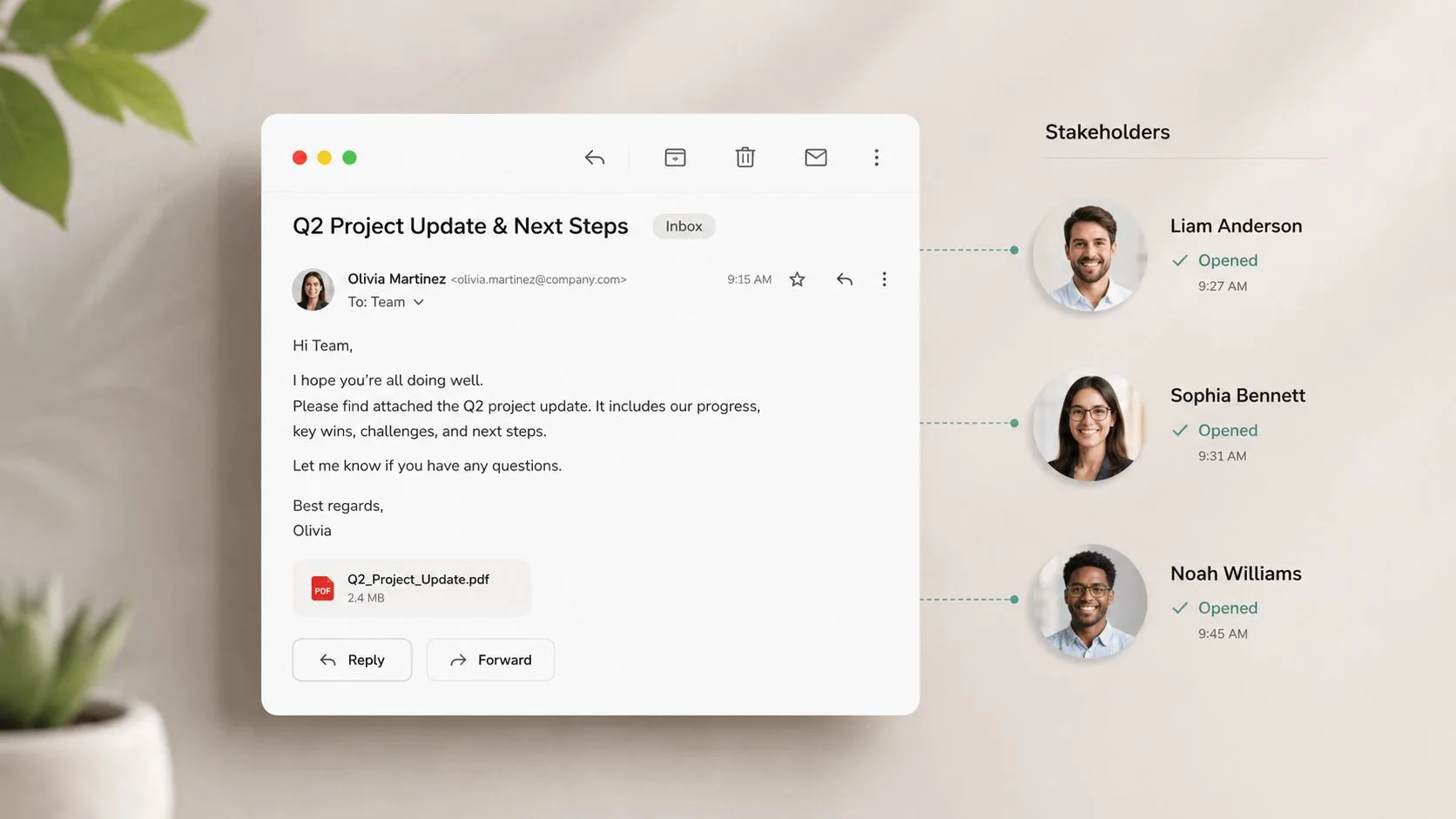
A buying committee can create a false sense of progress. One contact may open a proposal repeatedly while the economic approver, technical reviewer, or legal stakeholder hasn’t seen it. If you treat the most active recipient as the whole account, your forecast becomes fragile.
For group emails, map each recipient to a role before you send the message. A proposal shared with a finance leader, department head, procurement contact, and operational user should produce different follow-up actions depending on who engages. Mail Tracker for Gmail’s open counts and message-level timestamps can help you see which tracked recipients have opened the thread, giving you a factual basis for stakeholder outreach.
Consider an enterprise proposal where three of five committee members open the document. That doesn’t prove internal alignment. It does suggest that you should identify the two non-openers, confirm whether they need the material in another format, and prepare the active recipients to discuss the remaining objections.
Use engagement to find gaps, not to label people
An unopened message might reflect a crowded inbox, a forwarding rule, a mobile preview, or an address that isn’t actively monitored. Don’t send a pointed note saying you know someone hasn’t read the proposal. Instead, contact the person with a role-specific reason, such as asking whether pricing, security, implementation, or commercial terms belong in their review.
Repeated opens can help identify a potential internal champion, but the stronger confirmation is a reply that adds context, introduces another stakeholder, or agrees to a next step. Combine Gmail tracking with organizational research and meeting notes so open activity supports, rather than replaces, stakeholder mapping.
4. Mobile-First Sales Follow-Up Strategy
A sales opportunity doesn’t pause because you’re away from your desk. Field sellers, traveling executives, recruiters, and distributed account teams often receive the most useful engagement signal while they’re between meetings. If the alert waits until someone returns to a laptop, the signal loses practical value.
Gmail usage research summarized by Gmail mobile statistics places roughly 75% to 85% of Gmail opens on mobile devices. Another cited breakdown reports 84.08% mobile access versus 15.92% desktop access. The exact mix varies by source and audience, but the operational conclusion is consistent: a Gmail tracking workflow needs to work on phones, not only in a desktop browser.
Mail Tracker for Gmail supports tracked sending and notifications through Gmail on Android and iOS. Enable push alerts on the devices you use, then keep a short mobile response template for common situations, such as confirming receipt, offering two meeting options, or asking one qualifying question.
Build a mobile response standard
A mobile alert should trigger an action that fits the situation. A prospect opening a pricing email may deserve a call when the account is active and the message is timely. A cold prospect opening an introduction doesn’t automatically justify interrupting them.
- Protect focus: Use priority notifications for active opportunities instead of alerting on every low-value touch.
- Log the action: Record calls, replies, and next steps immediately in your mobile CRM or team notes.
- Respect time zones: Check the recipient’s local time before calling or sending a second message.
- Keep it readable: Make mobile emails short, scannable, and easy to answer.
5. Invisible Tracking for Relationship-Sensitive Outreach
Tracking can support timing, but it can also affect trust. A visible tracking signature may feel acceptable in a high-volume prospecting workflow and awkward in a sensitive executive, recruiting, consulting, or long-term account relationship. The right choice depends on the relationship, the recipient’s expectations, and your organization’s privacy practices.
Mail Tracker for Gmail’s Premium invisible tracker removes the visible tracking signature while preserving open-related activity. That feature may suit mature relationships where an added footer would look distracting, but invisibility shouldn’t become a way to conceal behavior that your organization would be unwilling to explain.
Use open data alongside replies, clicks, meeting attendance, and direct statements. A passive candidate opening a recruiter’s message several times may be reviewing the role, sharing it, or returning to find contact details. An account manager should still ask a useful question rather than implying that the recipient’s activity reveals a decision.
Tracking should make your follow-up more considerate, not more invasive.
Document how your team uses tracking, define when visible tracking is the default, and prepare a clear answer if a recipient asks whether email activity is monitored. Privacy-conscious contacts may prefer an opt-out or explicit consent. In sensitive outreach, transparency and restraint usually protect the relationship better than extracting every available signal.
6. Prospecting List Qualification Through Open Rate Analysis
A list can look large and still be operationally weak. Before a team invests more effort in a source, compare engagement by origin, segment, role, and message relevance. Mail Tracker for Gmail open counts and Premium daily reports can help identify which groups deserve more research and which should be paused for review.
Don’t use a single open threshold as a universal definition of list quality. Open behavior varies with audience, device, sender reputation, message type, and privacy technology. A low result may indicate poor targeting, weak deliverability, an unsuitable subject line, or contacts who never consented to receive the message. The metric tells you where to investigate.
A practical qualification review can compare:
- Source quality: Referrals, manual research, event contacts, and purchased lists should be evaluated separately.
- Segment behavior: Examine industry, role, company size, and geography independently.
- Repeat activity: Multiple opens can help prioritize research, but they don’t confirm intent.
- Downstream outcomes: Replies, meetings, unsubscribes, and qualified opportunities matter more than attention alone.
For example, if a recruiter sees stronger engagement from candidates sourced through a specialist community than from a broad database, the next step isn’t automatically to buy more contacts. Review consent, role fit, message relevance, and reply quality first. A smaller, better-matched list may produce a healthier workflow than a larger list that creates complaints and wasted follow-up.
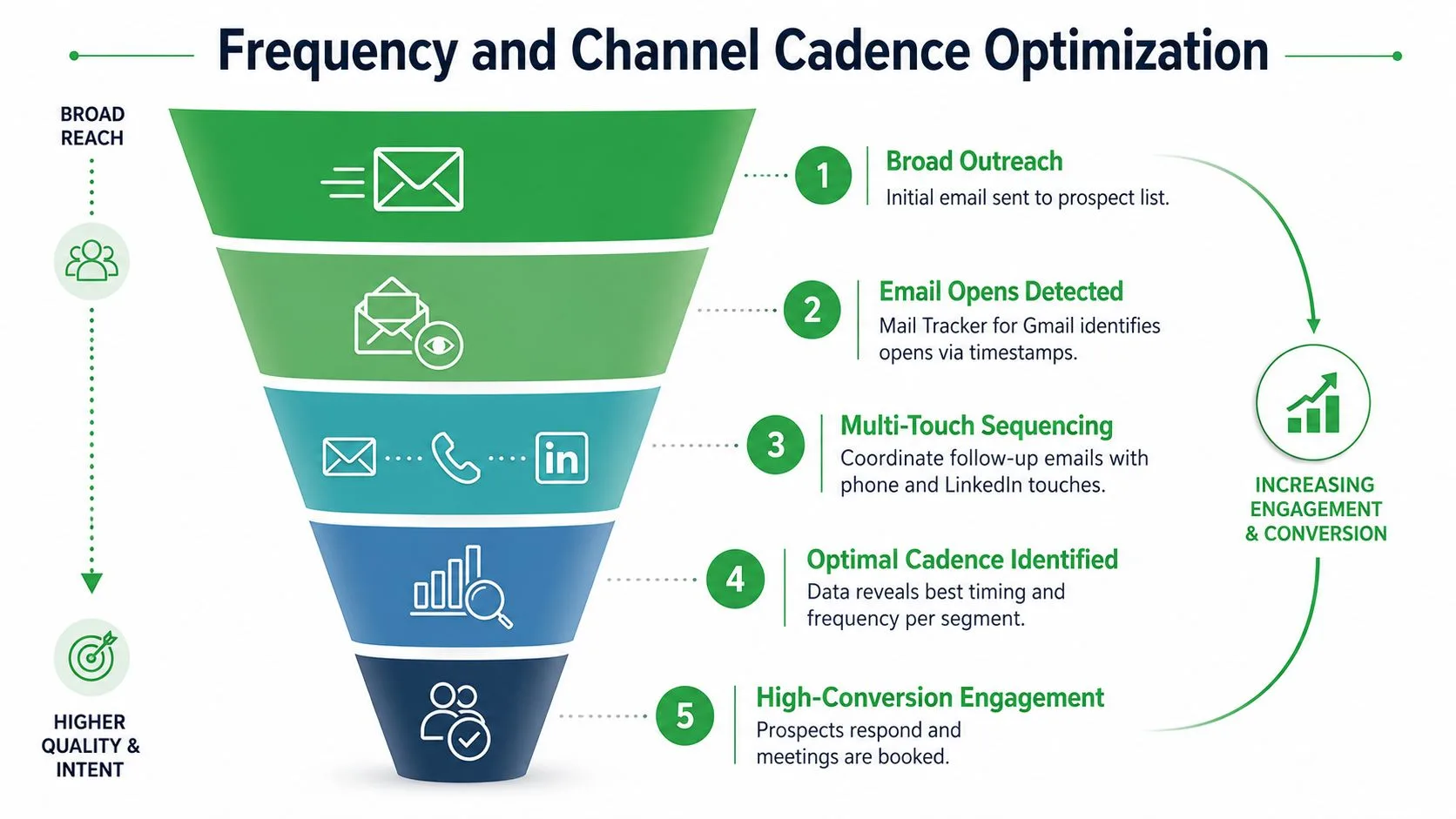
7. Frequency and Channel Cadence Optimization
More touches don’t always create more conversations. A sequence needs enough persistence to avoid premature abandonment, but each message should add context, answer a likely question, or offer a different route to engage. Repeating “just checking in” across Gmail, phone, and LinkedIn creates noise rather than coordinated outreach.
Benchmark guidance for high-velocity outreach commonly recommends two to three days between early follow-ups, followed by four to seven days later, with a stopping point after three to six total touches depending on lead temperature. These recommendations are summarized in email follow-up benchmarks for SDR teams. Other cadence data reports that waiting about three days produced a 31% increase in reply rate, while contacting a lead within 24 hours yielded about a 25% average reply rate and waiting longer than four days reduced response likelihood, as summarized by sales follow-up cadence research.
Use Mail Tracker for Gmail timestamps to adjust the next touch, but don’t build a sequence around opens alone. If an email opens and the prospect answers a phone call, that combination is more useful than the open by itself. If a recipient opens repeatedly but never replies and has shown no other engagement, slow down or stop.
Coordinate the channel mix
Set rules for when email gives way to a call, LinkedIn message, referral, or pause. Test cadence models on small segments, watch unsubscribe signals, and give sales development managers visibility into exceptions. Channel coordination should feel like one thoughtful conversation, not several disconnected systems competing for attention.
8. Buyer Journey Mapping Through Email Engagement Signals
Email activity can help organize a buyer journey when you connect it to content and account context. A first open on an educational note may indicate basic awareness. Several opens on a proposal, implementation guide, or ROI explanation may justify a more specific conversation. Neither pattern proves stage progression by itself.
Mail Tracker for Gmail provides timestamps, open counts, and tracking history that can help you build a simple activity record inside Gmail. Use that record to ask better questions: Which message prompted a reply? Did the prospect engage after a meeting? Are several stakeholders reviewing the same material? Has activity stopped after a commercial objection?
Avoid rigid scoring systems that turn open counts into artificial certainty. You can use internal labels such as early engagement, evaluation activity, and decision activity, but define them with additional evidence. A prospect who opens a message repeatedly might be comparing options, forwarding the content, or returning to a detail they don’t understand.
Pair email signals with human evidence
Meeting attendance, replies, proposal views, stakeholder introductions, and explicit deadlines provide stronger journey evidence. If a contact opens a case study but won’t discuss the problem, keep the account in a nurture state. If they reply with implementation questions, involve the right internal specialist and update the next step.
The best journey map helps a rep decide what to do next. It shouldn’t pretend that Gmail activity can reveal a buyer’s private intent.
9. Team Accountability and Sales Metrics Transparency
Managers need enough visibility to coach behavior without turning tracking into surveillance. Mail Tracker for Gmail can show whether tracked messages were opened, how often activity occurred, and when a follow-up happened. Those details can support a specific coaching conversation, especially when a rep’s activity pattern differs from the outcome of the account.
Start with transparent expectations. Explain which metrics the team will review, how list quality affects interpretation, and which actions matter. A manager might examine response timing after inbound interest, whether reps complete planned touches, and whether opened messages lead to replies or meetings. Open rate alone can reward a compelling subject line even when the message attracts no qualified conversation.
Use the email metrics dashboard guidance to structure reviews around a balanced set of indicators. Compare reps fairly by considering territory, segment difficulty, account maturity, and message type. A lower open rate on a difficult enterprise segment may be less concerning than a high open rate on an unqualified list that produces no pipeline.
Coach the behavior you can change, then inspect the outcome that matters.
Celebrate useful experimentation, such as a rep discovering that a role-specific subject line earns better replies. When activity doesn’t lead to meetings, review the opening, offer, qualification question, and follow-up approach. Don’t use tracking data to shame people or demand instant contact every time a recipient opens an email.
10. GDPR and Privacy-Compliant Tracking Strategy
A responsible Gmail sales workflow treats consent and privacy as operating requirements, not legal text added after launch. Before enabling tracking, document what your organization collects, why it collects it, who can access it, how long it’s retained, and how recipients can express a preference.
Mail Tracker for Gmail describes a privacy approach based on open events rather than reading email content, and it documents user data rights and GDPR-related practices. Review the current GDPR email compliance guidance with your legal or privacy team before deploying tracking across markets. Product documentation can support your process, but it doesn’t determine your organization’s legal obligations.
Visible tracking signatures can be a sensible default because they make the practice apparent. If your organization uses the Premium invisible tracker, define when it’s permitted, document the rationale, and provide a clear response if someone asks about tracking. Recruiting teams should be especially careful with candidate communications, since trust and personal-data expectations affect the entire relationship.
- Document the practice: Include tracking information in the relevant privacy notice.
- Honor preferences: Stop messages promptly when recipients unsubscribe or request no further contact.
- Train users: Explain the difference between an open event and confirmed intent.
- Review regularly: Update procedures as regulations, platforms, and organizational practices change.
For a practical implementation perspective, consult the operator playbook for cold email, then adapt the process to your jurisdiction, audience, and lawful basis.
10-Point Sales Best Practices Comparison
| Strategy | Implementation Complexity 🔄 | Resource Requirements ⚡ | Expected Outcomes 📊 | Ideal Use Cases 💡 | Key Advantages ⭐ |
|---|---|---|---|---|---|
| Follow-Up Sequencing with Real-Time Open Data | 🔄 Low, Gmail-native setup; requires prompt human action | ⚡ Minimal, Mail Tracker + mobile/desktop notifications | 📊 Faster response; higher reply rates (example: quicker closes) | 💡 High-velocity SDR/inside sales, time-sensitive proposals | ⭐ Real-time timing signal; immediate, contextual follow-up |
| Data-Driven Campaign Optimization Using Daily Email Reports | 🔄 Medium, analysis cadence and A/B discipline needed | ⚡ Moderate, Premium reports, analyst/time for review | 📊 Improved open rates and messaging; measurable ROI | 💡 Marketing teams, campaign optimizations, A/B testing | ⭐ Consolidated daily metrics; historical trend visibility |
| Multi-Recipient Open Tracking for Group Decision-Making Visibility | 🔄 Low–Medium, per-recipient tracking view and mapping | ⚡ Minimal, tracking + recipient-role mapping effort | 📊 Clear stakeholder engagement insights; prioritization data | 💡 Enterprise/buying-committee outreach, proposals | ⭐ Visibility into which decision-makers engaged |
| Mobile-First Sales Follow-Up Strategy | 🔄 Low, enable mobile integration and notifications | ⚡ Minimal, mobile devices and push notifications | 📊 Faster remote responses; improved win rates on the road | 💡 Field sales, traveling execs, distributed teams | ⭐ Always-on alerts; synchronized tracking across devices |
| Invisible Tracking for Relationship-Sensitive Outreach | 🔄 Low (feature toggle), requires policy/ethical review | ⚡ Moderate, Premium plan + governance | 📊 Discreet engagement monitoring; potential reputational risk | 💡 C‑suite outreach, referral networks, sensitive contacts | ⭐ Preserves email appearance while tracking opens |
| Prospecting List Qualification Through Open Rate Analysis | 🔄 Medium, needs sufficient volume and segmentation | ⚡ Moderate, reports, time, sample testing | 📊 Better list quality; efficiency gains in outreach focus | 💡 SDR leaders, list purchasing decisions, targeting strategy | ⭐ Data-backed segmentation and vendor/list evaluation |
| Frequency and Channel Cadence Optimization | 🔄 Medium–High, multi-channel coordination required | ⚡ Moderate, tools and cross-team alignment | 📊 Reduced fatigue; higher multi-channel conversion rates | 💡 ABM, multi-touch sequences combining phone/LinkedIn/email | ⭐ Smarter sequencing; lower unsubscribe and complaint rates |
| Buyer Journey Mapping Through Email Engagement Signals | 🔄 Medium, requires scoring and interpretive rules | ⚡ Moderate, historical tracking, CRM alignment | 📊 Stage-based insights; improved qualification and handoffs | 💡 AE/SDR handoffs, pipeline prioritization, nurturing flows | ⭐ Enables stage-appropriate messaging and prioritization |
| Team Accountability and Sales Metrics Transparency | 🔄 Medium, policy, access controls, and coaching workflows | ⚡ Moderate, manager time, reporting, privacy policies | 📊 Objective coaching data; clearer performance trends | 💡 Sales management, coaching, performance reviews | ⭐ Verifiable outreach metrics for targeted coaching |
| GDPR and Privacy-Compliant Tracking Strategy | 🔄 Medium, legal review and ongoing policy maintenance | ⚡ Moderate, documentation, opt-outs, training | 📊 Lower legal risk; improved recipient trust and reputation | 💡 EU operations, privacy-sensitive markets, regulated sectors | ⭐ Compliance-first approach; transparent, lawful tracking practices |
Build a Better Gmail Outreach Loop
The strongest Gmail workflows don’t treat tracking as a shortcut to persuasion. They use it to reduce uncertainty around execution. Start by writing a relevant message for a defined audience, then personalize the subject and body around the recipient’s role, current problem, or business context. Make the next step easy to understand and easy to decline.
Send at a deliberate time, especially for inbound interest. One widely cited speed-to-lead benchmark reports that responding within five minutes can make a prospect about nine times more likely to engage than waiting longer, while a test across 433 companies found that only 7% responded within the first five minutes and more than 50% failed to respond within five business days, as summarized in sales follow-up response statistics. Another analysis found that the average company takes 42 hours to respond to an inbound lead, according to inbound lead response research. These figures support fast response systems, but they don’t justify contacting someone repeatedly without relevance or consent.
Use Mail Tracker for Gmail to observe open events, timestamps, repeat activity, and notifications inside Gmail. Then apply judgment. An open may tell you to review the thread, check the account context, or prepare a useful follow-up. It doesn’t tell you that the prospect is interested, that they’re the decision-maker, or that calling immediately will be welcome.
A workable operating loop looks like this:
- Write and personalize: Match the message to the recipient and the reason for contact.
- Set the cadence: Define the next touch, spacing, stopping point, and channel before sending.
- Interpret carefully: Combine opens with replies, clicks, meetings, stakeholder activity, and explicit intent.
- Review performance: Favor replies, meetings, qualified pipeline, and cumulative sequence performance over isolated open rates.
- Protect trust: Record consent choices, honor opt-outs, and explain tracking practices clearly.
Start with one or two practices, such as real-time follow-up for priority threads and a weekly review of daily reports. Once your team has clear response, unsubscribe, and consent policies, add multi-recipient visibility, mobile norms, journey mapping, and coaching dashboards. A gradual rollout makes it easier to see whether the workflow improves sales quality or merely increases activity.
For deliverability fundamentals, review The Social Search deliverability tips and apply the guidance to your own sending environment. Mail Tracker for Gmail can keep engagement visibility in Gmail, while relevance, restraint, timing, and recipient respect determine whether that visibility becomes a better sales conversation.
Mail Tracker for Gmail adds read receipts, open counts, timestamps, and real-time notifications to tracked messages sent from Gmail, with support for web and mobile workflows. Visit Mail Tracker for Gmail to see how in-Gmail tracking can support faster follow-up, clearer reporting, and more responsible sales execution.
Ready to track your emails?
Add Mail Track for Gmail from the Google Workspace Marketplace and know the moment your emails are opened. Free and unlimited.
Add to GmailMore reading
More from Tips
How to Know if Someone Blocked Your Email in Gmail: Signs and Checks
How to know if someone blocked your email in Gmail: what a block really does, how to read bounce messages, and how open tracking tells a block from silence.
Gmail Snooze Email: How It Works and When to Use It
Learn how Gmail snooze email works, how it differs from archive and mute, and how to pair it with open tracking so follow-ups come back at the right time.
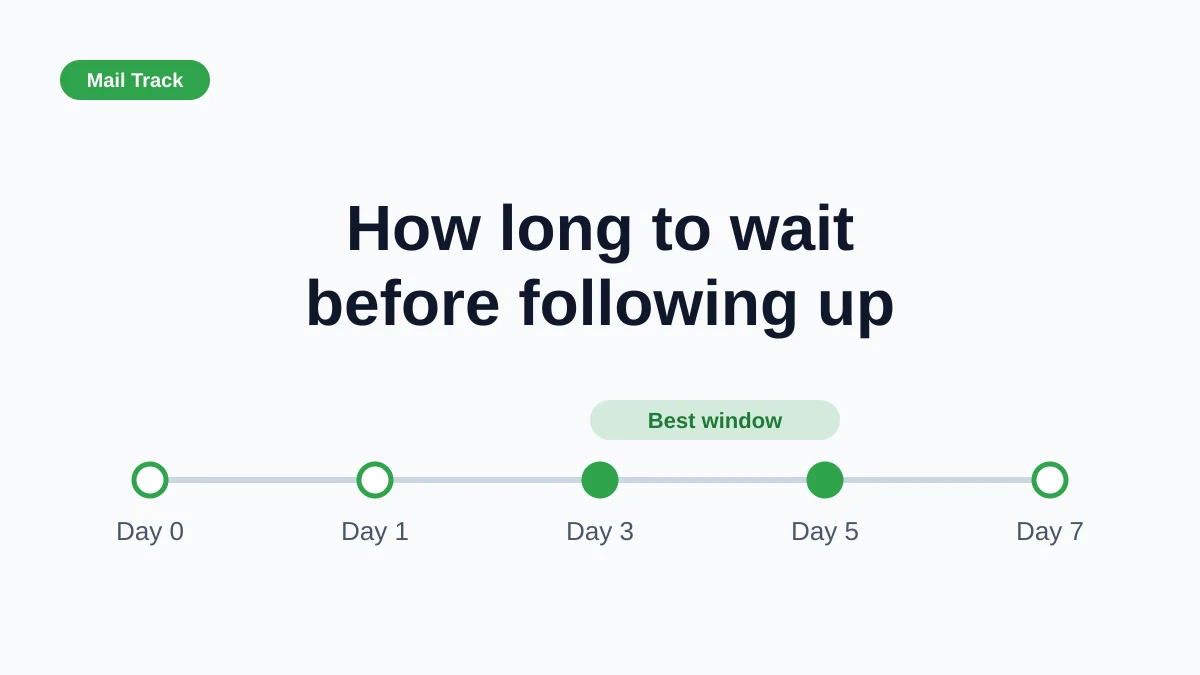
How Long to Wait Before Following Up on an Email (With Tracking Signals)
How long to wait before following up on an email? Use these waiting windows by situation, plus open and click signals in Gmail to time each follow-up.