
Data Retention Policies: A Practical Guide for Compliance
Learn how to design, document, and enforce data retention policies that satisfy GDPR, CCPA, and industry rules while keeping operations efficient.
80% of organizations struggle with data retention compliance, and that’s the reason retention policies belong in the center of governance, not in a dusty appendix of IT procedures (industry report summary). When retention is weak, companies keep data too long, delete it too soon, or apply one rule across records that plainly need different clocks. That’s how audits get messy, legal holds break down, and privacy teams spend weeks reconstructing decisions that should’ve been documented from the start.
The job isn’t just to store less. It’s to decide what must stay, what must go, and what has to be provable later. That becomes especially important when email metadata and tracking telemetry sit inside workflows for sales, recruiting, and customer success, because those records can be operationally useful and privacy-sensitive at the same time.
Why Data Retention Policies Matter More Than Ever
The biggest mistake I see is treating retention like housekeeping. It isn’t. A serious data retention policy is a control that helps you hold data for the right period, prove why it stayed, and delete it when the obligation ends.
The compliance stakes are no longer theoretical. Automated retention tooling is now common in large organizations, yet compliance gaps still persist, and over-retention can create material cost pressure. That is why retention now sits beside access control and logging as a core governance function, not a back-office cleanup task.
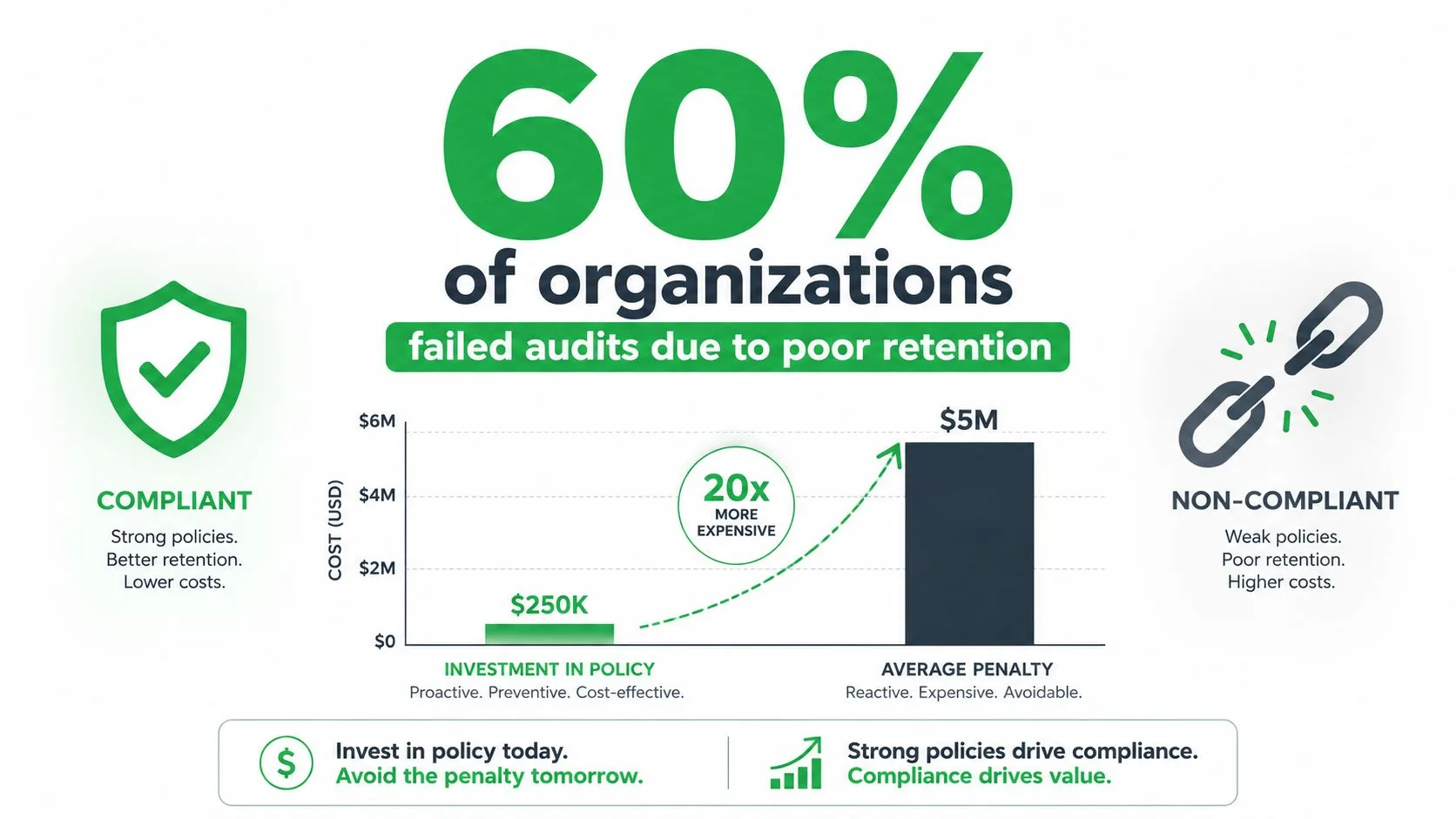
Risk always runs two ways
Keep data too long, and you increase exposure. Old records expand eDiscovery scope, clutter storage, and raise the odds that unnecessary personal data gets pulled into a dispute or a breach. Delete too early, and you can lose evidence for audits, tax work, employment matters, or legal holds.
Practical rule: retention policy design should always ask two questions, what must stay for compliance, and what must be deleted to reduce risk.
That balance is why historical retention rules still matter. Some obligations are fixed by law, while others are purpose-based and require active justification. HIPAA requires covered entities in the U.S. to retain certain documentation for at least 6 years, Sarbanes-Oxley requires 7 years for audit trails, and some finance and tax rules stretch further depending on the record class and jurisdiction (historical retention policy context). GDPR-based guidance goes the other direction and pushes organizations to keep personal data only as long as necessary for the stated purpose (GDPR retention guidance).
The same tension shows up in email metadata and tracking telemetry. Sales, recruiting, and customer success teams often depend on open receipts, delivery logs, and related signals, including tools such as Mail Tracker for Gmail, but those records still need a retention rule, an owner, and a deletion point. If you let templates ignore those workflow details, the policy may look neat on paper and fail in practice.
Retention is a measurable compliance discipline. It is not about stuffing more into storage, it is about making deletion defensible and repeatable.
Core Components of a Defensible Retention Policy
A defensible policy starts with structure, not slogans. The policy statement tells people the governing principle, but the schedule does the actual work. The schedule is where each data class gets a retention period, a trigger, and a lawful reason to exist.
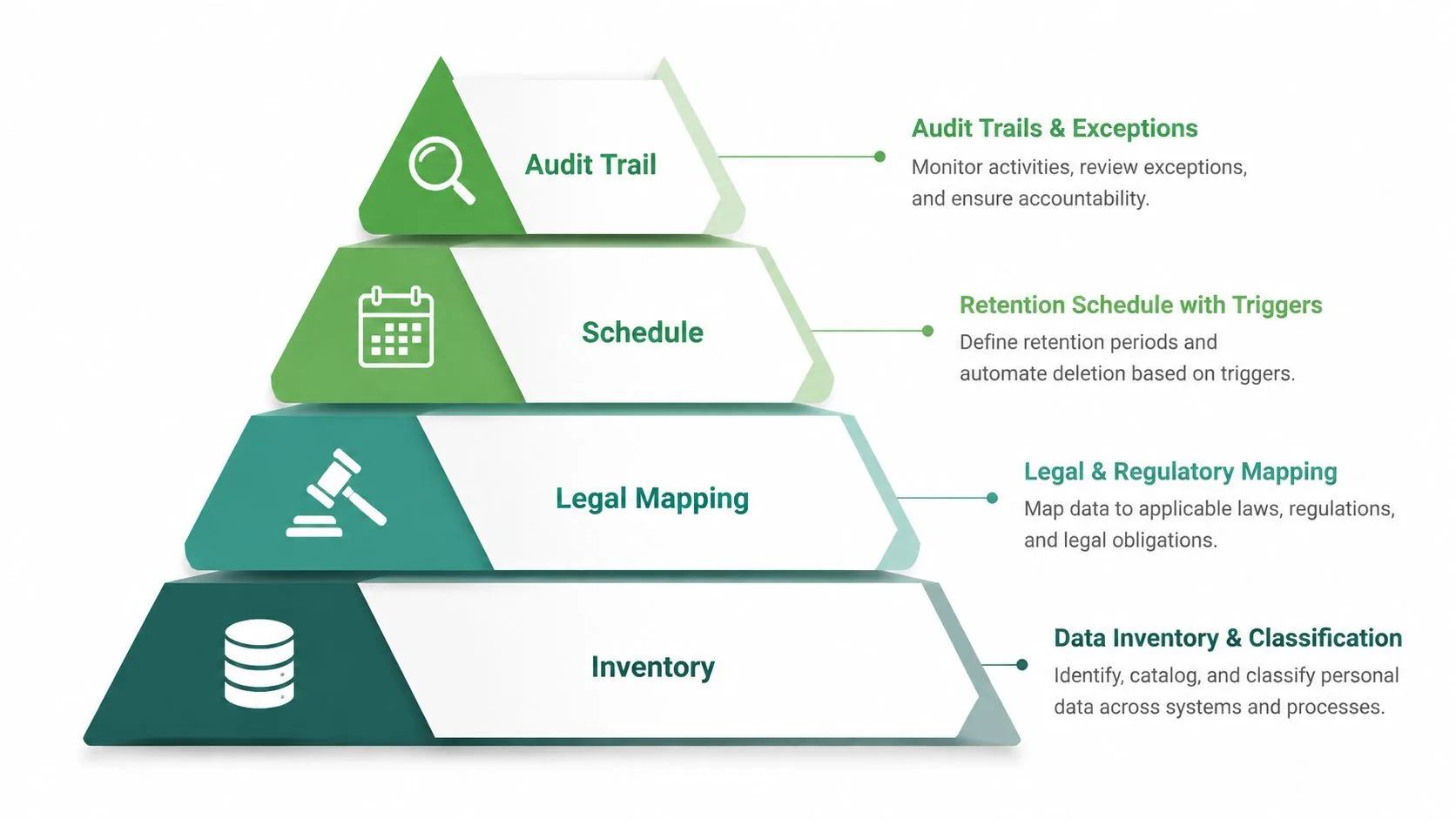
Start with inventory and classification
You can’t retain what you haven’t identified. Inventory the systems first, then classify the records by type and sensitivity. If you skip this step, the policy becomes abstract language that nobody can apply consistently.
A strong schedule should map every record class to an explicit period and basis. That’s the point emphasized in practical drafting guidance, including the need for a retention schedule, disposal trigger, and documented legal or regulatory basis (policy structure guidance). A good starting point for teams that need a usable draft is a data retention policy template, because it forces you to name the categories, owners, and disposal logic instead of hand-waving around them.
Define the clock and the end state
The retention clock should start from something concrete, creation, receipt, close of account, end of employment, or another defensible event. If you don’t define the trigger, teams will improvise, and improvisation is where audits fail.
You also need to name the approved end-of-life action. Some records should be archived, others securely deleted, and some anonymized. Microsoft’s retention framework supports retain, delete, or both sequentially, which is useful because records often need to stay discoverable for compliance before they disappear from the user’s view (Microsoft retention framework).
If a team can’t tell whether a record should be archived, deleted, or anonymized, the policy isn’t ready yet.
That’s also why machine-actionable rules matter. When classification at ingestion drives lifecycle automation, the policy stops depending on memory and starts behaving like a control.
Regulatory Retention Requirements Across Major Frameworks
Retention rules do not line up neatly across frameworks because different records carry different legal weights. Employee files, audit logs, tax documents, contracts, and customer data sit under separate obligations, so a single blanket rule usually breaks in one of two ways. It keeps records longer than needed, or it deletes them before the business can defend itself.
A practical comparison looks like this:
| Framework | Retention Philosophy | Typical Timeframe | Key Data Types |
|---|---|---|---|
| HIPAA | Minimum required retention for specified compliance records | At least 6 years | Policies, procedures, compliance documentation |
| Sarbanes-Oxley | Preserve auditability and evidence | 7 years | Audit trails, workpapers, financial records |
| GDPR | Keep personal data only as long as necessary for the stated purpose | No fixed universal period | Personal data, customer and employee data |
| CPRA-style privacy guidance | Minimum-necessary retention with justification | Purpose-based, schedule-driven | Consumer and operational personal data |
| Finance and tax guidance | Longer retention for records needed in audits and disputes | Commonly 7 to 10 years in practice | Email, transaction records, key financial documents |
The table reflects how retention programs get built. Some frameworks set a floor, others set a principle, and the schedule has to reconcile both. In U.S. healthcare and finance, that often means fixed minimums. In GDPR environments, it means purpose-based retention and secure deletion once the purpose ends.
The practical test shows up during system changes. Records rarely fail retention only because the policy was weak, they fail because migrations, mailbox moves, and archive projects break the controls that were supposed to preserve them. A finance-focused reference on avoid migration risks in finance is useful here because those projects often expose gaps in holds, metadata preservation, and disposition timing.
The other mistake is tying the schedule to department names instead of data classes. Financial records can need long retention while marketing engagement data is cleared much sooner, even inside the same company. Email is a good example, because the message content, headers, and tracking telemetry do not all belong to the same retention bucket. For the privacy workflow side, the Gmail-specific overview on GDPR email compliance helps show how policy language has to map to actual mailbox behavior.
Email Tracking Data and Retention Obligations
Email tracking changes the retention conversation because it creates more than message content. Open receipts, timestamps, open counts, and tracking events are records too, and in practice they can reveal behavior about a person’s attention, timing, and response patterns. That makes them retention-relevant, not just operationally interesting.
For teams using tools such as Mail Tracker for Gmail, the question isn’t whether the data is useful. It usually is. The question is how long tracking telemetry should stay available after it’s done serving a sales, recruiting, or customer-success purpose. That’s where purpose-based retention matters, because keeping tracking history forever is hard to justify when the operational need has passed.
Separate operational telemetry from compliance records
A read receipt can support follow-up, but that doesn’t mean every open event belongs in long-term storage. Tracking history used for short-term outreach should usually be handled differently from records that support accounting, disputes, or legal obligations. The key is to classify the data by purpose before you choose the retention period.
This is also where UK GDPR style reasoning becomes practical. Organizations have to justify how long personal data is kept, and they can’t default to convenience as the answer. A useful operational reference for the visibility side of email behavior is can you tell if someone read your email, because tracking features often drive the data that later needs governance.
Use the product, but govern the telemetry
One option in Gmail workflows is Mail Tracker for Gmail, which adds read receipts and open notifications inside Gmail. In a retention program, that means you should account for the telemetry it generates the same way you’d account for any other operational record, by defining what gets kept, for how long, and under what deletion rule.
Practical rule: if the tracking event no longer supports a legitimate business purpose, don’t leave it sitting in active systems just because it’s easy to keep.
That matters in sales follow-up and recruiting workflows, where people often want a quick answer to whether an email was opened. Open data can be helpful, but it doesn’t need to become indefinite history. The retention schedule should spell out when those events are summarized, archived, or deleted, and who can access them in the meantime.
Designing Your Retention Schedule Step by Step
A schedule that works in an audit starts with boring discipline. First, inventory every data source, including inboxes, shared drives, CRM exports, HR systems, logs, and collaboration tools. If a team says data is “in the cloud” without naming the system, it’s not ready for retention mapping.
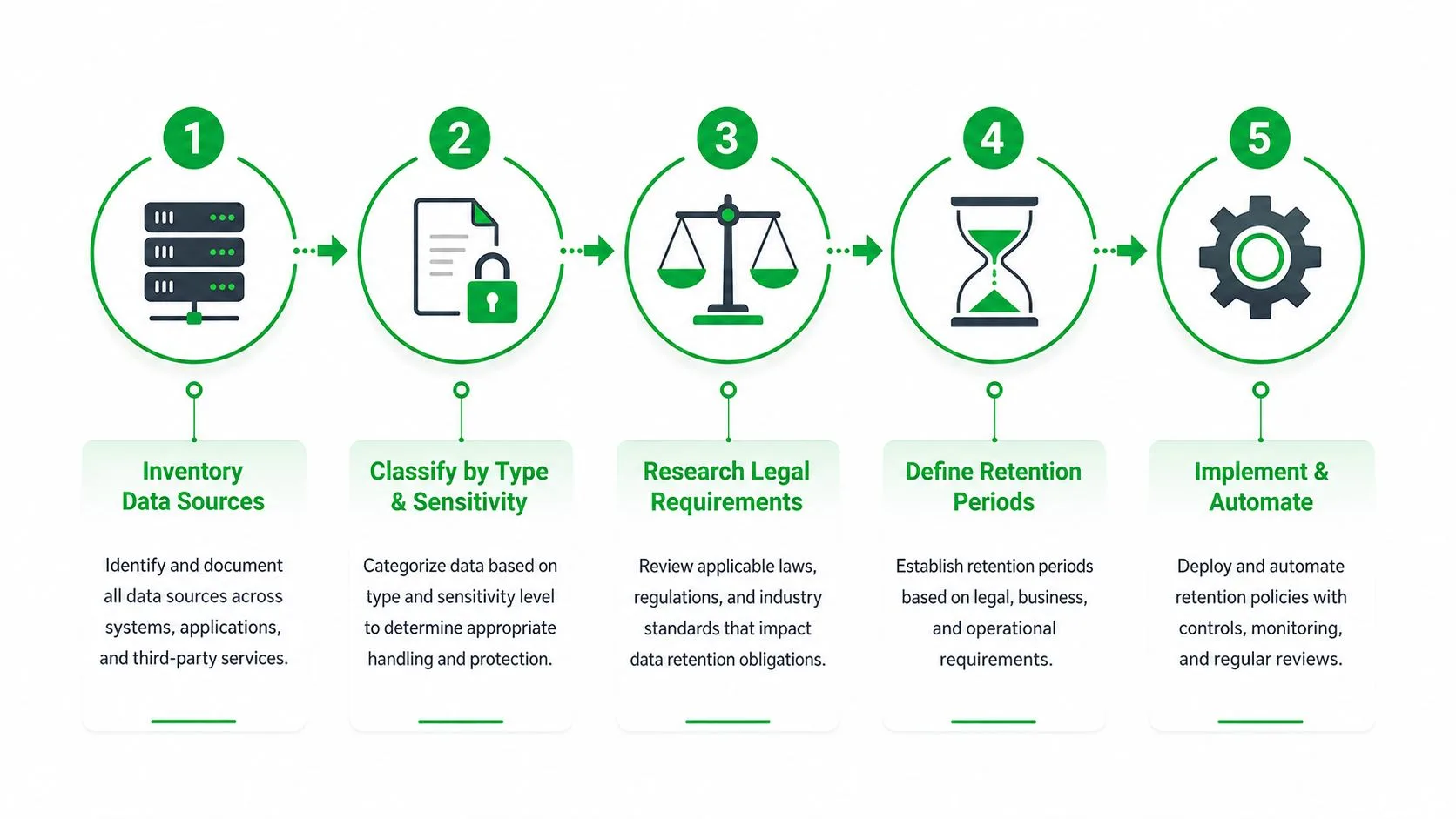
Build the schedule around actual records
After inventory, classify by type and sensitivity. Customer emails don’t behave like tax files, and server logs don’t behave like employment records. Each class needs its own period and rationale.
Then research the legal drivers that apply to each class. That includes jurisdictional rules, contract terms, litigation risk, and sector-specific guidance. A practical reason to do this carefully is that some records need longer retention windows, while others are better deleted early to reduce exposure.
Document the trigger and the disposal method
A schedule isn’t complete unless it says when the clock starts. Creation, receipt, case closure, termination, or account closure can all be valid triggers, but you have to pick one and apply it consistently. You also need to define the end state, secure deletion, anonymization, overwrite, or archival.
A simple pattern works well in practice:
- Customer emails: retain while the relationship is active, then apply a defined post-closure period tied to service, disputes, or contractual needs.
- Financial records: keep according to the strongest applicable legal or tax obligation.
- Employee files: separate personnel, payroll, and benefits records instead of lumping them together.
- Marketing data: delete or aggregate sooner when the business purpose ends.
A good schedule also includes exception handling. Legal holds, investigations, and audits should pause routine deletion, and that pause needs to be visible in the records. If teams can’t show why a record wasn’t deleted on time, the schedule is too fragile.
The best schedules are reviewed regularly and tied to legal obligations, business value, and storage cost. That’s not bureaucracy, it’s how you keep the policy alive while tools, markets, and regulations keep changing.
Implementing Retention Controls in Email and Collaboration Systems
Policy only matters when the system can enforce it. In email and collaboration platforms, that usually means retention labels, lifecycle rules, archive tiers, and deletion workflows that act on the item itself, not just on the mailbox or tenant.
A common failure pattern is applying broad retention at the wrong level. If every message in a mailbox gets the same treatment, a sales thread, a payroll notice, and a compliance record all end up under one rule, and that makes audits harder to defend. The platform has to distinguish item types and apply the right action to each one.
What implementation looks like in practice
A recruiting team may need candidate correspondence visible for a period, then removed from daily use while still remaining discoverable if a hold appears later. A customer-success team may need message history for handoffs, but not forever in the primary inbox. Retention labels do the heavy lifting here, because administrators define the rule once and the platform applies it the same way every time.
Automation should also account for archive movement. Records that no longer need active access can move to cheaper storage before deletion, which preserves a usable trail without leaving stale content exposed in the live environment. Mature programs also document what happens to backup copies, because deletion in the live system does not automatically remove every replica.
If your Gmail workflow depends on message classification, a practical reference like how to auto-label emails in Gmail can help align labeling with downstream retention logic. Classification and retention have to work together, or the schedule turns into manual cleanup dressed up as policy.
Retention controls fail when users can override them casually or when administrators cannot prove what happened to a record after the clock expired.
That is why implementation needs both enforcement and evidence. The system should show what rule applied, when it applied, and what action followed. In Microsoft Purview, the retention framework supports retaining, deleting, or doing both in sequence, which gives compliance teams a clearer audit trail without forcing every record into the same lifecycle path.
Balancing Data Minimization Against Operational Needs
Shorter retention sounds cleaner, and often it is. But it’s not always the right answer. Teams still need enough data to resolve disputes, answer auditors, support customer service, and explain decisions that happened months earlier.
The target is not minimal retention at any cost. It’s minimum data, for the minimum time, with enough evidence to prove compliance. That’s a better standard because it respects privacy without crippling operations.
Where shortening retention helps
Engagement telemetry is the clearest example. Open histories, read events, and other tracking records can age out quickly when they’ve served their purpose. For many teams, that means summarizing activity sooner and deleting item-level detail once follow-up, reporting, or dispute resolution needs have passed.
Where shortening retention hurts
Legal defense is the obvious case. If a team deletes too aggressively, it can’t reconstruct what happened during a sales cycle, a hiring process, or a complaint. Finance, HR, and compliance teams usually need more traceability than a marketing dashboard does, and that difference has to show up in the schedule.
The hardest part is making people accept that one timeline won’t fit everything. A policy that keeps too much data is expensive and risky. A policy that keeps too little becomes unusable the first time someone asks for proof.
The practical answer is to build purpose-based classes and review them often. That keeps the organization from confusing operational convenience with legitimate retention need.
Auditing and Monitoring Your Retention Program
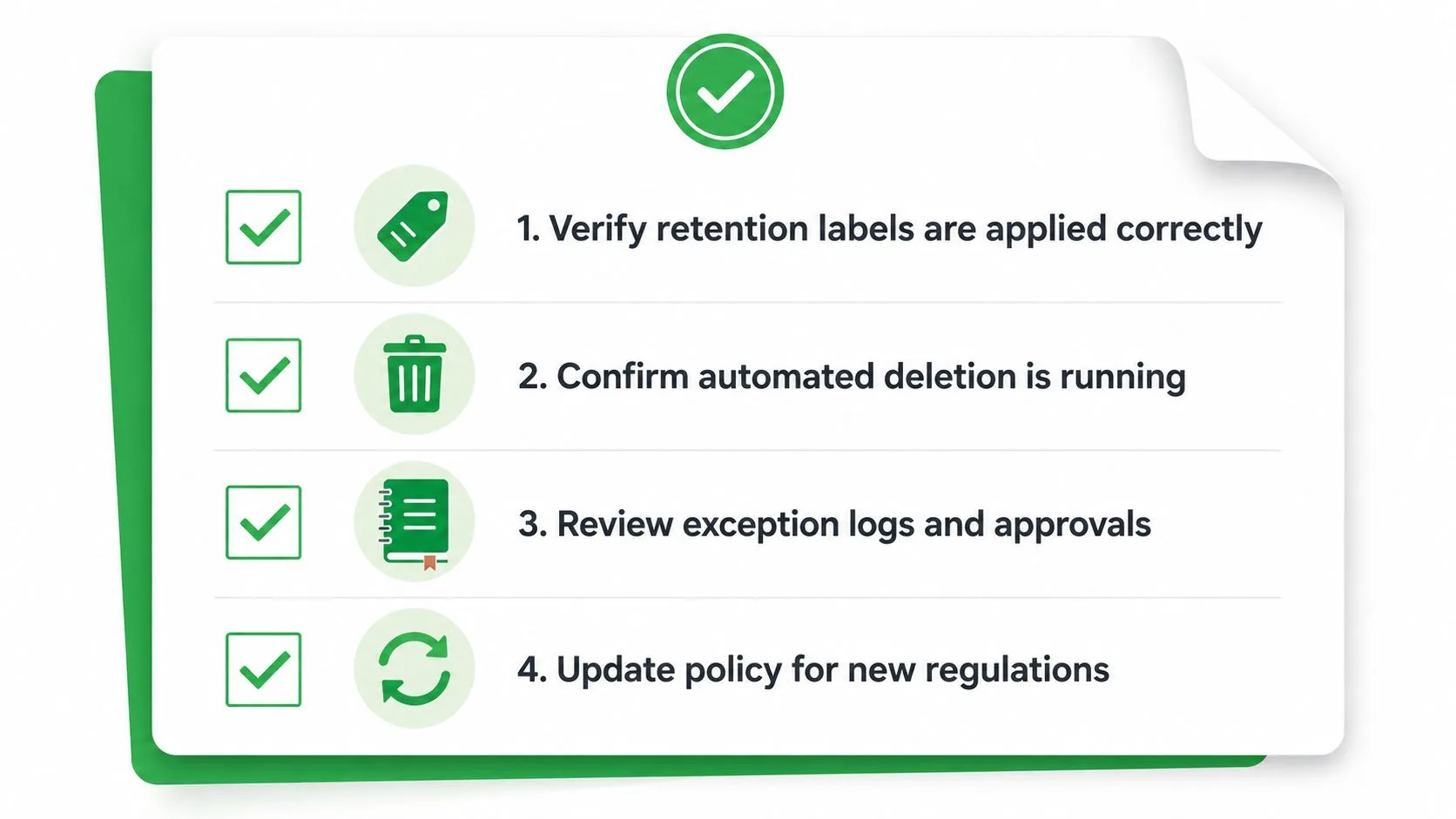
A retention program is only real if you can test it. Start by checking whether labels are applied correctly, whether automated deletion runs on schedule, and whether exceptions are logged with a clear approval trail. Then verify that legal holds stop deletion when they should.
For a more system-level lens, an auditing IT systems guide can help teams structure control checks across tools, owners, and evidence sources. That matters because retention failures often hide in gaps between applications, not inside a single platform.
What auditors expect to see
They want evidence, not promises. That means policy versions, schedule approvals, exception logs, deletion records, and periodic review notes that show the program is still current. It also means someone owns the policy and knows when it was last updated.
Monitoring should include a regular check for stale data, untagged records, and systems that weren’t in scope when the policy was first written. When a new app enters the stack, retention has to extend there too, or the policy becomes partial and unreliable.
Practical rule: if you can’t show the last review date, the last deletion run, and the last exception approval, the program isn’t audit-ready.
Retention isn’t a set-and-forget exercise. It’s a living control that has to keep pace with changing tools, changing obligations, and changing business value.
Mail Tracker for Gmail gives Gmail teams read receipts, open notifications, and message-level tracking that can be folded into a retention program instead of left outside it. If your sales, recruiting, or customer success workflow depends on open telemetry, visit Mail Tracker for Gmail and review how its tracking data can be governed alongside the rest of your retention schedule.
Ready to track your emails?
Add Mail Track for Gmail from the Google Workspace Marketplace and know the moment your emails are opened. Free and unlimited.
Add to GmailMore reading
More from Guides

How Accurate Is Email Tracking? What Opens Really Tell You
How accurate is email tracking in Gmail? Learn why opens get overcounted or missed, how to spot false opens, and which signals to trust before you follow up.

Email Tracking Pixel: How It Works, How to Spot One and Where It Falls Short
What is an email tracking pixel, how does it show an open in Gmail, how can you find one, and why Gmail and Apple Mail proxies limit what it can tell you.

7 Example Email Accept Job Offer Templates
Use these 7 example email accept job offer templates for formal, concise, and enthusiastic replies, with subject lines, clauses, and sending tips.