
Effective Subject Lines for Sales Emails: 10 Examples
Explore 10 effective subject lines for sales emails, with use-case templates, testing tactics, and Gmail tracking tips for timely follow-ups.
The best subject line is the one you can prove. A clever phrase might earn an open, but it won’t create a sales conversation if it doesn’t fit the recipient, the promise in the message, and the next step you’re asking them to take. Effective subject lines for sales emails give buyers a clear reason to look, not a demand to click.
The popular advice that “shorter is always better” also needs more precision. A large-scale analysis of more than 130 million B2B emails found that strong subject lines were usually 4–7 words, lowercase, and personalized for the recipient, while a separate 5.5 million-email study found the highest open rate, 46%, among 2–4-word subject lines. Yet another analysis found the 9–13-word range reached a 40.20% open rate, showing that length depends on audience, context, and the action you want after the open. Research on A/B testing cold email subjects supports treating length as a testable variable rather than a permanent rule.
The ten patterns below are organized by the trigger they use, including curiosity, relevance, trust, urgency, value, pain, proof, and collaboration. Each example includes a practical use case, a failure mode, and a way to connect testing and timing decisions with Mail Tracker for Gmail, including real-time opens, open counts, timestamps, and follow-up signals.
1. The Question Mark Strategy
Quick question about Acme Corp’s new product launch
Questions create an information gap. The recipient knows the email concerns a relevant topic, but not the specific question, which gives them a reason to open. The format also feels less like a broadcast promotion and more like the beginning of a conversation.
Use this pattern when you’ve identified a concrete business context:
- Company initiative: “Question about your team’s lead generation strategy”
- Role-specific concern: “Quick question about your sales follow-up process”
- Trigger-based outreach: “Question about Acme Corp’s launch timeline”
The question must connect to the recipient’s role or company. “Quick question” by itself is weak because it offers no relevance. A sales leader may respond to a question about pipeline visibility, while a recruiter may care more about candidate response timing. Don’t use a company name you haven’t verified, and replace placeholders before sending.

Timing the follow-up
Mail Tracker for Gmail lets you observe when a tracked message is opened, how many times it’s opened, and when those opens occur. If the recipient opens during an active buying moment, a follow-up within two hours can make sense for an urgent conversation, but that timing shouldn’t become an automatic rule for every prospect. A repeated open without a reply may call for a useful follow-up rather than an immediate call.
The visible tracking signature on Mail Tracker for Gmail’s free plan may also make the tracking approach more transparent. If there’s no response, use a helpful follow-up email after no response instead of repeating the same question.
2. The Value-First Hook
A practical insight for sales leaders
This pattern leads with what the recipient may gain, not what the sender wants. It works best when the promised insight is specific enough to feel useful and relevant to a known responsibility. “Ideas for growth” is broad. “Faster follow-ups for Gmail sales teams” gives the reader a clearer reason to pay attention.
Good examples include:
- Operational improvement: “Faster follow-ups for Gmail sales teams”
- Role-based education: “Email visibility for sales managers”
- Industry-specific learning: “A tracking insight for recruiters”
The strongest version may include a verified finding, but only when the email body explains it clearly. For example, research cited by B2B email subject-line analysis reports that personalized subject lines averaged a 46% open rate, compared with 35% without personalization. That fact can support a message about relevance, but it shouldn’t be turned into an exaggerated promise that personalization will produce the same result for every audience.
Make the value tangible
The body should deliver the insight quickly. If the subject promises visibility, explain how the recipient can see open counts, timestamps, or follow-up opportunities. If it promises a process improvement, show the specific workflow rather than hiding the value behind a product pitch.
Test two different value propositions with comparable audiences. Mail Tracker for Gmail can show open counts and timestamps for each variation, while your CRM or sales process should record replies and meetings. Guidance on sales email best practices is most useful when you apply it to a real workflow, not when you copy a formula without adapting it.
3. The Social Proof Reference
Sarah Chen suggested I reach out
A mutual connection changes the context of a cold email. The recipient can place the sender inside an existing network, which may reduce uncertainty and make the message feel more credible. The trust trigger only works, however, if the relationship is real and the referrer is comfortable being named.
A stronger version adds context in the body:
Trust depends on context: Name the mutual connection only when you can explain how that person knows both sides and why the introduction is relevant.
“John from Acme referred me to your team” is more useful when followed by a sentence explaining whether John discussed the recipient’s sales process, recommended a specific contact, or approved an introduction. Don’t imply an endorsement that never happened. “Suggested I reach out” and “thought you might be interested” carry different levels of commitment, so choose the wording accurately.
Protect the referral
Verify the referrer’s permission before sending. Afterward, follow up with that person separately, thank them, and share the outcome without overstating progress. A referral email should feel like a personal introduction, not a campaign asset.
Mail Tracker for Gmail can help you compare engagement from referral-based messages with other outreach in your pipeline. Look at when the recipient opened and whether they returned to the email, then decide whether a thoughtful response or a call is appropriate. For a sensitive introduction, Mail Tracker Premium’s invisible tracker may fit better than a visible signature, provided your communication practices remain transparent and respectful.
4. The Time-Sensitive Urgency
Early-bird rate available through the end of the month
Urgency works when the deadline is genuine. A specific date gives the recipient useful context, while vague phrases such as “act now” often sound like pressure without a reason. The subject should make clear what ends and why the timing matters.
Consider these variations:
- Commercial deadline: “Special pricing for new Mail Tracker for Gmail users, ends Friday”
- Program window: “Applications close on Friday”
- Planning deadline: “Q4 outreach planning window ends Friday”
The body must repeat the deadline and explain it. Perhaps a seasonal promotion is ending, a budget allocation closes, or a limited onboarding window has a real capacity constraint. Don’t manufacture scarcity. A false deadline may win an open once, but it damages trust when the same offer appears later.
Use urgency as a timing signal
Mail Tracker for Gmail’s real-time open notifications can show that a recipient has engaged with a time-sensitive message. That signal can justify a prompt, relevant follow-up while the deadline remains meaningful. It doesn’t justify calling repeatedly or assuming an open means purchase intent.
Premium features should be described accurately. If you’re promoting a Premium plan, use a genuine trial or offer window rather than an exaggerated claim. Give the recipient enough information to make a decision without forcing them to reply immediately. Urgency should clarify the cost of waiting, not replace a credible value proposition.
5. The Curiosity Narrative
The surprising reason your follow-ups aren’t landing
Curiosity is stronger when it points to a substantive finding rather than an empty mystery. The subject should hint at something unexpected that matters to the recipient’s work, then the opening sentence should resolve the curiosity quickly.
Examples include:
- Process insight: “What follow-up timing reveals about sales outreach”
- Industry observation: “An unexpected pattern in recruiter outreach”
- Behavioral question: “Why opened emails still go unanswered”
Don’t use a surprising claim unless you can support it. For example, the B2B subject-line research describes high-performing formulas involving mutual connections, known challenges, and trigger events, and reports that personalization increased open rates by 26% on average. That evidence can inform a message about contextual relevance, but it doesn’t prove that a particular prospect will respond.
Curiosity must pay off
The email body should explain the finding, give the recipient a practical implication, and connect the lesson to the proposed next step. A subject like “The hidden issue in your follow-ups” fails if the body only introduces a generic software demo.
Mail Tracker for Gmail can help you test different curiosity angles by segment. Compare open counts, timestamps, and repeat opens for messages aimed at sales leaders, recruiters, or consultants. Premium daily reports can help organize tracked activity for review, but don’t turn individual recipient behavior into an unsupported industry claim. Use anonymized aggregate observations only when your own data supports them.
For more practical ideas on increasing email engagement, focus on the complete experience, not the subject line alone.
6. The Personalized Pattern Recognition
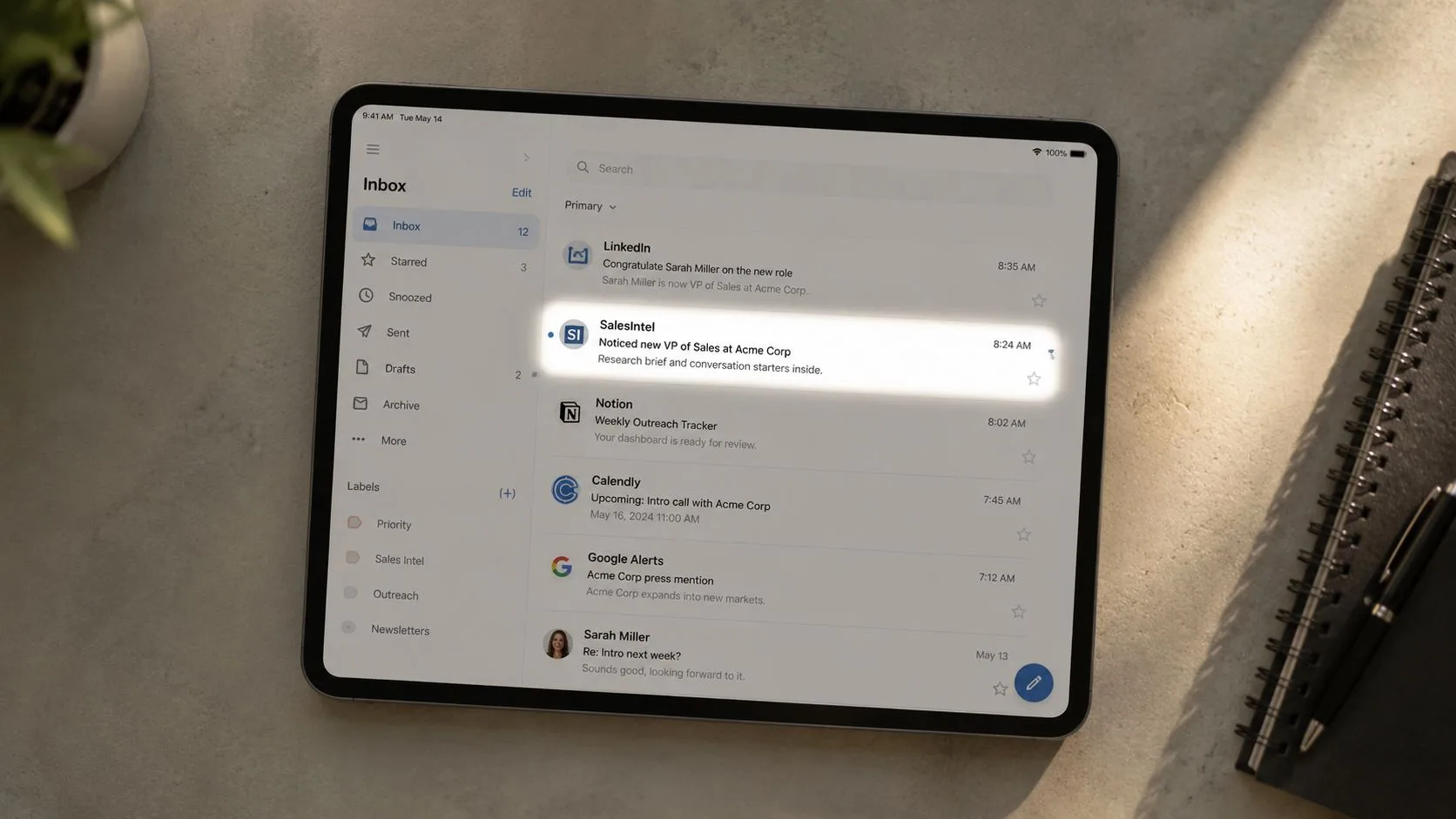
Noticed your team hired a new VP of Sales
Specific observations signal preparation. A new executive hire, product launch, funding announcement, or strategic shift can create a legitimate reason to contact someone. The observation doesn’t need to be dramatic. It needs to be accurate and connected to a plausible business priority.
Research public information before writing:
- Company sources: Check press releases, product pages, and newsroom updates.
- Professional sources: Review LinkedIn and public executive announcements.
- Market sources: Use reputable news coverage or company databases such as Crunchbase.
The subject “Congrats on the Series B, bet your sales team could use better visibility” can work when the funding event is real and the email explains why growth may create a tracking or follow-up challenge. It can fail if the sender assumes too much, uses outdated information, or turns a congratulatory note into an unrelated pitch.
Personalize selectively
Deep research takes time, so reserve it for high-value prospects and strong-fit accounts. Use your sales system to identify warm or engaged prospects, then verify the specific trigger manually. A personalization token can insert a company name, but it can’t detect whether the observation makes sense.
Mail Tracker for Gmail can show whether research-heavy messages earn attention, but an open doesn’t validate the accuracy of your assumption. Compare opens with replies and conversation quality. If recipients open but correct your premise, improve the research before expanding the pattern.
7. The Direct Value Exchange
Quick template for your team’s follow-up process
A resource-led subject line offers something useful before asking for time. Templates, guides, frameworks, datasets, and short analyses can reduce resistance because the recipient understands what they’ll receive.
Examples:
- For sales representatives: “Free sales email template for better follow-ups”
- For managers: “Quick framework for outreach visibility”
- For consultants: “Client follow-up guide for Gmail”
The resource must be useful. A thin PDF that exists only to introduce a sales pitch will teach recipients to ignore future offers. Tailor the format to the role, too. A sales rep may want a subject-line library, while a sales manager may prefer a process guide that helps the team identify which threads need attention.
Let engagement shape the library
Mail Tracker for Gmail can track whether recipients opened the resource email and whether they returned to it. Use those signals to prioritize a relevant follow-up, not to imply that an open equals consent to a sales call. A recipient who opens a template may want the template and nothing more.
If the resource discusses Gmail workflows, it can accurately explain how Mail Tracker for Gmail adds read receipts, open counts, timestamps, and notifications inside Gmail. Keep the product mention relevant to the resource rather than forcing it into every asset. Over time, compare which resource categories attract meaningful replies, then create more material in those areas.
8. The Problem-Agitate-Solve Format
Missed follow-ups make outreach harder, here’s a fix
The problem-agitate-solve structure compresses a buyer journey into one line. It names a familiar obstacle, acknowledges the operational consequence, and hints at a practical answer. The approach works when the problem is real and the solution appears immediately in the email body.
Examples include:
- “Missed follow-ups, lost momentum, better visibility”
- “Can’t see if clients read your emails, here’s a fix”
- “Slow follow-ups make deals harder, try this workflow”
The format can fail when the agitation becomes melodramatic. “You’re losing huge revenue every day” sounds accusatory without evidence. A calmer line such as “Making follow-ups harder” may suit a senior buyer better, especially when the email is an initial introduction.
Deliver the promise immediately: If the subject teases a solution, explain that solution in the first line instead of making the recipient search for it.
Test the complete message
Keep the subject concise enough to display clearly on the recipient’s device, but don’t treat an arbitrary character limit as a universal performance law. Historical benchmarks conflict. One dataset found 61–70-character subject lines achieved a 43.38% open rate, while another reported that 6–10-word lines reached a 21% open rate, compared with 9% for 21–25-word lines. Sales subject-line benchmark data illustrates why your own audience and goal still matter.
Use Mail Tracker for Gmail to compare PAS subjects with value-led or question-led alternatives. Then check replies and booked conversations. A subject that earns attention but produces no useful dialogue isn’t automatically the winner.
9. The Social Proof at Scale
[Number] of sales teams use your solution
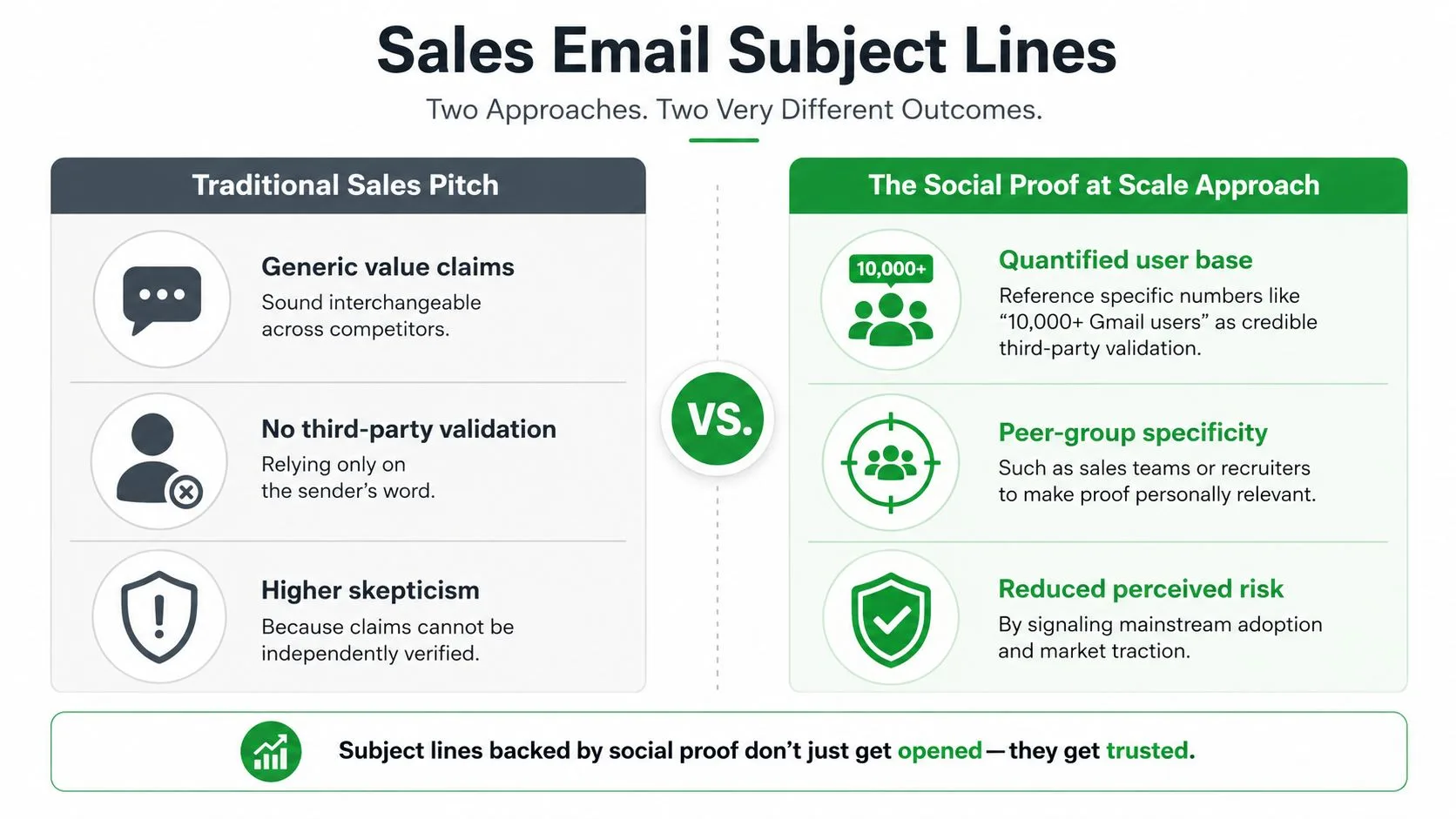
Aggregate proof reduces perceived risk when the number and peer group are accurate. “Thousands use us” is less persuasive than a precise, verifiable statement about similar users. The closer the peer group matches the recipient, the more useful the comparison becomes.
Possible structures include:
- Role relevance: “[Number] of sales teams track Gmail outreach”
- Audience relevance: “[Number] of recruiters monitor candidate emails”
- Product adoption: “[Number] of Gmail users track sales emails”
Use figures from your product dashboard or a public source you can substantiate. Don’t round a number upward merely to make it sound more impressive, and don’t use a customer count that includes people outside the recipient’s category without saying so. Social proof must reduce uncertainty, not create a misleading impression.
Match proof to the buyer
Early-stage founders may respond to evidence of broad adoption, while enterprise decision-makers may care more about workflow fit, privacy, and administrative control. Mail Tracker for Gmail has a public Google Workspace Marketplace rating of 4.6 out of 5 stars from more than 2,677 reviews, which can serve as third-party validation when the claim is relevant and linked to the product context. Don’t imply that a marketplace rating proves business outcomes.
Test social-proof subjects against a direct value subject for comparable segments. Mail Tracker for Gmail’s open counts can show which framing earns attention, but your sales records should determine whether the attention leads to qualified replies. Proof opens the door. It doesn’t replace a credible explanation of what the recipient gets.
10. The Collaborative Positioning
Teaming up on better visibility into outreach
Collaboration language changes the posture of the email. Instead of presenting the recipient as a target and the sender as a vendor, it frames both parties around a shared challenge. That can reduce defensiveness, but only when the shared opportunity is real.
Examples include:
- Operational partnership: “Teaming up on faster sales follow-ups”
- Company-specific opportunity: “Partnering with Acme on outreach visibility”
- Shared challenge: “Working together on candidate response timing”
The body must explain the collaboration. Mention the specific workflow you’re referring to, the outcome both sides care about, and what a sensible first conversation would cover. “Let’s partner” without context feels vague and self-serving. “Could we compare how your team handles Gmail follow-ups and share a practical workflow?” gives the recipient a clearer reason to respond.
Use opens to choose the next move
Mail Tracker for Gmail can identify engaged recipients through real-time notifications, timestamps, and open counts. If someone opens a collaboration message, follow up with an observation or a focused call invitation rather than an immediate product dump. The purpose of the signal is to improve timing and relevance.
Use “we,” “together,” and “our” only when the message reflects genuine mutual value. Offer useful insight before asking for commitment, and make the exchange clear from the first paragraph. Collaboration is a positioning choice, not a substitute for research.
10 Sales Email Subject-Line Strategies Compared
| Strategy | Implementation Complexity 🔄 | Resource & Speed ⚡ | Expected Outcomes 📊 | Ideal Use Cases 💡 | Key Advantages ⭐ |
|---|---|---|---|---|---|
| The Question Mark Strategy: “Quick question about [Company Name]” | 🔄 Low–Moderate, simple format but needs targeted detail | ⚡ Fast to write; low resources; timely follow-up improves impact | 📊 Higher open rates and replies; moderate conversion if body delivers | 💡 Cold outreach, quick personalization, discovery asks | ⭐⭐⭐⭐, sparks curiosity; conversational; easy to A/B test |
| The Value-First Hook: “[Specific Insight] for [Industry/Role]” | 🔄 Moderate–High, needs genuine data/insight | ⚡ Slower to craft; requires research or metrics | 📊 Attracts qualified engagement and decision-makers | 💡 Account-based outreach, executive pitches, educational cadence | ⭐⭐⭐⭐, positions sender as expert; higher-quality replies |
| The Social Proof Reference: “[Mutual Connection] suggested I reach out” | 🔄 Low, simple to implement when genuine referrer exists | ⚡ Fast once referral confirmed; low material resources | 📊 Dramatically higher opens/responses and trust | 💡 Warm intros, referral-based outreach, network-driven outreach | ⭐⭐⭐⭐⭐, immediate credibility; strong response lift |
| The Time-Sensitive Urgency: “[Limited Opportunity] ending [Specific Date]” | 🔄 Low–Moderate, straightforward but must be truthful | ⚡ Fast to deploy; must coordinate real deadlines | 📊 Boosts opens and rapid actions; short-term conversion lift | 💡 Limited promotions, trials, enrollment or seasonal offers | ⭐⭐⭐⭐, effective for conversion; risks if deadlines are false |
| The Curiosity Narrative: “[Unexpected Finding] about [Recipient’s Industry]” | 🔄 High, requires novel insight or research | ⚡ Slower; higher resource investment for unique data | 📊 High opens; positions sender as insider; shareable content | 💡 Thought leadership, content-led outreach, industry reports | ⭐⭐⭐⭐, memorable and engaging; must deliver on promise |
| The Personalized Pattern Recognition: “Noticed [Specific Action/Change] at [Company Name]” | 🔄 High, manual research per recipient; low scalability | ⚡ Slow per-target; high research resources | 📊 Very high opens/responses for high-value targets | 💡 ABM, enterprise outreach, high-touch prospecting | ⭐⭐⭐⭐⭐, highly relevant and credible; excellent conversion potential |
| The Direct Value Exchange: “Quick [Resource Type] for [Recipient’s Goal]” | 🔄 Moderate, resource creation + tailored framing | ⚡ Moderate speed; prep time to build valuable assets | 📊 Strong opens and goodwill; builds long-term engagement | 💡 Lead magnets, educational outreach, resource-first cadences | ⭐⭐⭐⭐, builds trust quickly; useful even without immediate sale |
| The Problem-Agitate-Solve Format: “[Problem], [Cost], [1-Sentence Solution]” | 🔄 Moderate, concise copywriting skill required | ⚡ Moderate; risk of mobile truncation (keep concise) | 📊 High persuasion potential and conversions if accurate | 💡 Pain-point targeting, demo invitations, solution teasers | ⭐⭐⭐⭐, emotionally resonant; clarifies value quickly |
| The Social Proof at Scale: “[Number] of [Peer Group] use [Your Solution]” | 🔄 Low–Moderate, needs verifiable numbers | ⚡ Quick to deploy if metrics are available | 📊 Reduces perceived risk; drives FOMO and adoption interest | 💡 Broad campaigns, market credibility plays, mid-funnel nurturing | ⭐⭐⭐⭐, signals traction and legitimacy when accurate |
| The Collaborative Positioning: “Teaming up on [Shared Opportunity/Challenge]” | 🔄 Moderate–High, requires genuine mutual value proposition | ⚡ Slower to convert; requires follow-up and alignment | 📊 Higher positive responses; longer relationship-building wins | 💡 Partnership outreach, co-marketing, joint problem-solving | ⭐⭐⭐⭐, reduces defensiveness; fosters long-term collaboration |
Turn Opens Into Better Sales Decisions
A subject line test should answer a business question. Start with one variable, such as curiosity versus direct value, company-specific relevance versus role-specific relevance, or a short line versus a more descriptive line. Keep the audience, offer, email body, and sending conditions comparable so the result has a reasonable interpretation.
Mail Tracker for Gmail can supply the behavioral layer inside Gmail. You can review real-time notifications, open counts, timestamps, and message-level activity, then use those signals to decide when a follow-up deserves attention. The data is useful for timing, but it isn’t a complete measure of intent. A recipient may open accidentally, return to an email while forwarding it, or read the message without wanting a sales conversation.
That’s why the winner isn’t necessarily the subject with the most opens. Connect opens to replies, qualified conversations, and booked meetings in your sales process. If a curiosity subject produces opens but no replies, try a clearer promise. If a longer relevance-led subject earns fewer opens but creates better conversations, it may be more valuable for your goal. The right length depends partly on whether you’re optimizing for initial attention or downstream fit.
Review results by audience and timing rather than treating every recipient as identical. A recruiter, consultant, account manager, and sales development representative may respond to different triggers. Compare patterns within each group, and record the context that made the subject line credible.
Keep every promise. Use genuine personalization, real deadlines, and evidence you can verify. Don’t use a mutual connection without permission, don’t manufacture scarcity, and don’t hide a sales pitch behind a misleading resource offer. Recipients may also have different expectations about tracking, so make choices that respect your privacy commitments and communication norms.
For teams building a repeatable outbound process, better measurement can complement an SDR for hire by giving representatives clearer signals for prioritizing follow-ups. The goal isn’t to chase every open. It’s to help sellers spend time on the conversations where timing, relevance, and intent align.
Start with ten subject-line patterns, but don’t turn them into scripts. Adapt the trigger to the account, test one meaningful change, and let replies and conversations decide what stays in your sales playbook.
Mail Tracker for Gmail adds read receipts, real-time open notifications, double check marks, open counts, and per-message timestamps directly inside Gmail on web and mobile. Use those signals to test subject-line patterns and time follow-ups more thoughtfully, then visit Mail Tracker for Gmail to see how it fits your sales workflow.
Ready to track your emails?
Add Mail Track for Gmail from the Google Workspace Marketplace and know the moment your emails are opened. Free and unlimited.
Add to GmailMore reading
More from Guides

How Accurate Is Email Tracking? What Opens Really Tell You
How accurate is email tracking in Gmail? Learn why opens get overcounted or missed, how to spot false opens, and which signals to trust before you follow up.

Email Tracking Pixel: How It Works, How to Spot One and Where It Falls Short
What is an email tracking pixel, how does it show an open in Gmail, how can you find one, and why Gmail and Apple Mail proxies limit what it can tell you.

7 Example Email Accept Job Offer Templates
Use these 7 example email accept job offer templates for formal, concise, and enthusiastic replies, with subject lines, clauses, and sending tips.