
Payment Reminder Email: Templates, Timing and Open Signals
Payment reminder email guide: five templates from a friendly heads-up to a final notice, a timing ladder for Gmail, and how open signals pick the right one.
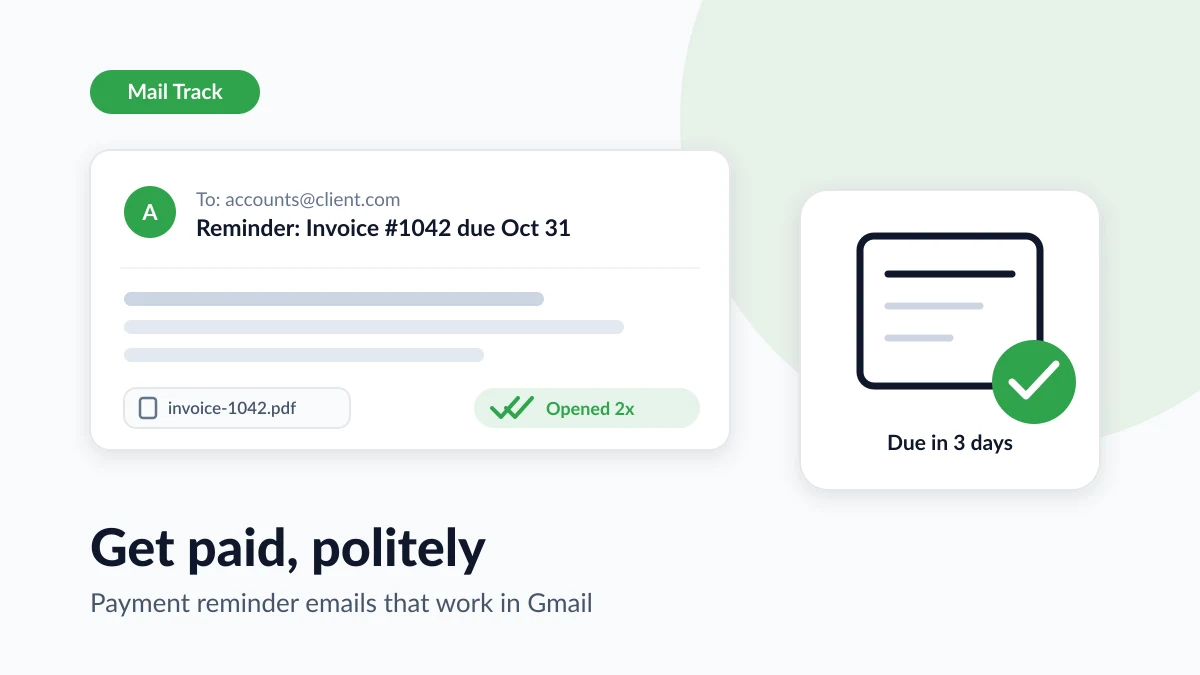
You finished the work, sent the invoice and moved on. The due date came and went. Now you are staring at your Sent folder, wondering whether to say something and how to say it without sounding desperate or rude. A good payment reminder email solves that problem. It is short, specific and polite, it arrives at the right moment, and it gets a little firmer if the silence continues.
This guide gives you five templates, from a friendly heads-up before the due date to a final notice, plus a timing ladder you can run from Gmail. It also shows how open signals from Mail Track for Gmail, a Chrome extension and Google Workspace add-on for email open and click tracking inside Gmail, help you choose the right reminder. A client who never opened the invoice needs a different message than one who opened it three times and still has not paid.
Why late payments are normal, and why reminders are not rude
If chasing money feels awkward, know how common it is. Intuit’s 2025 Small Business Late Payments Report, based on a January 2025 survey of 2,487 US small businesses with up to 100 employees, found that 56% were owed money from unpaid invoices, averaging about $17,500 per business. Almost half (47%) said some of their invoices were more than 30 days overdue.
Late payment is rarely personal. Invoices get buried, approvers go on holiday, a purchase order number is missing, or your invoice landed on the wrong side of a twice-monthly payment run. Treating the first reminder as a routine part of invoicing, not as a confrontation, changes both your tone and your results.
Three principles keep a reminder polite and effective:
- Assume an oversight. The first reminders should read as if you believe the client intends to pay, because most do.
- Make paying effortless. Attach the invoice again, include the payment link and restate the amount.
- Ask for one action by one date. “Could you confirm when payment will go out?” gets replies. “Please look into this” does not.
How to write a payment reminder email
Every reminder, whatever its tone, carries the same core facts. Put them in the first two sentences, before any softening language.
The subject line
Include the invoice number and the date. Before the due date, “Reminder: Invoice #1042 due October 31” is clear and friendly. Once the invoice is late, say so: “Invoice #1042 is now 14 days overdue” sets the tone before the message is opened. Avoid vague lines such as “Quick question”, which hide the point and are easy to skip.
The body
A reminder that gets paid usually has five parts:
- A warm opener that references the work, for example “Thanks again for the chance to work on the autumn campaign.”
- The facts: invoice number, amount, due date and what it covered.
- The way to pay: a link or your bank details, plus the invoice attached again.
- One clear ask: a date by which you expect payment or a reply.
- An offer to help: a line that says you are happy to resend the invoice, answer questions or discuss timing.
In the early reminders, add a courtesy line such as “If payment is already on its way, please ignore this note.” It saves face for a client who paid an hour before your email arrived. Leave out apologies, explanations of your cash flow and any mention of tracking, and keep every reminder shorter than the one before it.
Payment reminder email templates for every stage
Replace the bracketed placeholders and keep the structure. Send each one as a reply inside the original invoice thread, so the history stays in one place.
1. Upcoming payment reminder (three to five days before the due date)
Subject: Reminder: Invoice [number] is due on [due date]
Hi [first name],
Thanks again for working with us on [project]. A quick reminder that invoice [number] for [amount] is due on [due date]. You can pay it here: [payment link], and a copy is attached.
If payment is already scheduled, please ignore this note.
Best regards,
[your name]
2. Due date reminder
Subject: Invoice [number] for [amount] is due today
Hi [first name],
A friendly reminder that invoice [number] for [amount] is due today, [date]. The payment link is [payment link] and the invoice is attached again.
Could you confirm that payment is on its way? If you need anything to process it, just reply here.
Thanks,
[your name]
3. Polite overdue reminder (about one week late)
Subject: Invoice [number] is now [X] days overdue
Hi [first name],
I wanted to check in on invoice [number] for [amount], which was due on [due date] and is now [X] days overdue. These things slip through, so this is just a nudge.
Could you let me know when I can expect payment? If there is a problem with the invoice or the timing, I would rather hear about it than guess.
Thanks for your help,
[your name]
4. Firm reminder (two to three weeks late)
Subject: Overdue: Invoice [number], payment requested by [new date]
Hi [first name],
Invoice [number] for [amount] was due on [due date] and remains unpaid despite my reminder on [date of last reminder]. Please arrange payment by [new date, about five business days away].
Our terms allow a late fee of [fee or interest] on overdue balances, which I would rather not apply. If something is blocking the payment, call me on [phone number] or reply here.
Regards,
[your name]
5. Final notice (30 days or more)
Subject: Final notice: Invoice [number], [amount] outstanding
Dear [first name],
This is a final reminder that invoice [number] for [amount], due on [due date], is still outstanding after my messages on [dates]. If I do not receive payment or a reply by [date], I will [apply the late fee in our terms, pass the account to a collections agency, or begin the small claims process].
I value our working relationship and would prefer to close this today. The payment link is [payment link].
Sincerely,
[your name]
The ask tightens from stage to stage while the facts stay identical. That consistency makes the sequence feel professional rather than emotional.
Invoice follow-up timing: a ladder you can run from Gmail
Invoicing guides converge on the same cadence: a heads-up a few days before the due date, a note on the day, then follow-ups at roughly one week, two weeks and 30 days overdue, before you pick up the phone. After three or four unanswered emails, more email rarely helps.
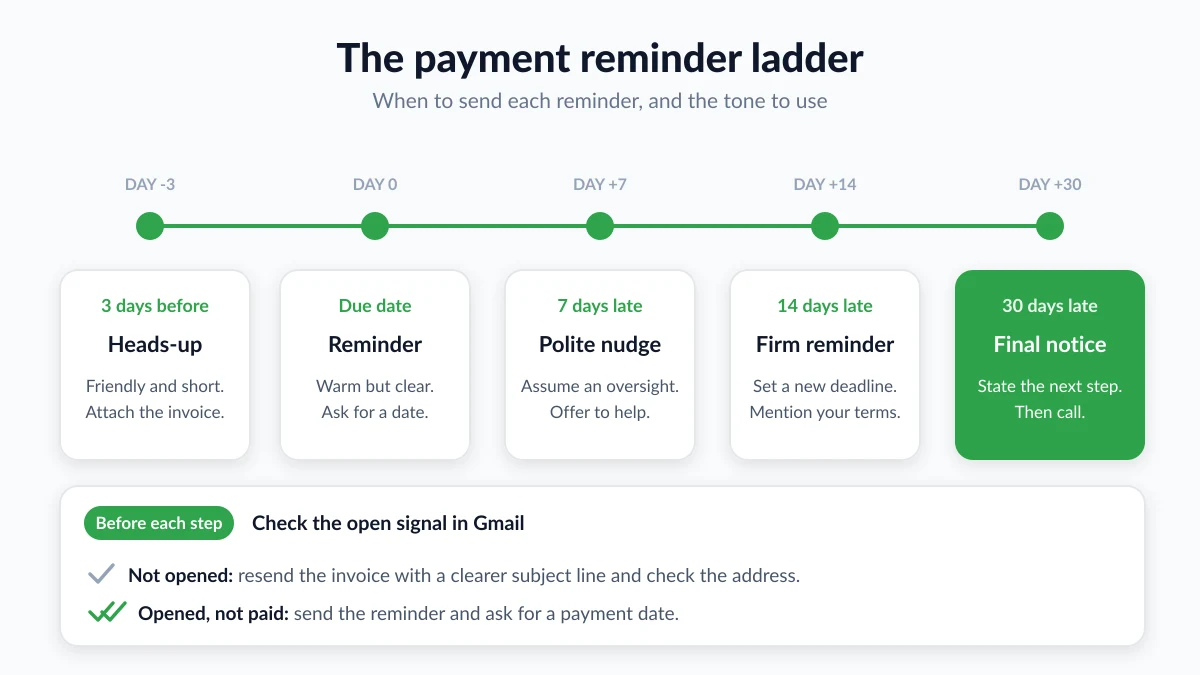
Gmail can run this ladder without extra software:
- Templates. Save each reminder once and insert it in two clicks. Google’s Gmail templates guide explains how to turn them on from the Advanced tab of Settings, and notes that templates are only available in Gmail on the web.
- Schedule send. Write the pre-due reminder when you send the invoice and schedule it for three days before the due date. Google’s schedule send help page says you can have up to 100 scheduled emails and that a cancelled one returns to your drafts.
- Snooze. After each reminder, snooze the thread to the next rung of the ladder so it reappears when the next step is due. Our guide to snoozing emails in Gmail covers the details.
- Nudges. Gmail can surface sent emails that may need a follow-up at the top of your inbox. The option lives under Nudges on the General tab of Settings, as Google’s help page on replying to messages describes, and requires conversation view to be on.
One caveat: do not queue the overdue reminders in advance. A client who pays on day two should never receive a “now overdue” message on day eight. Schedule only the pre-due reminder and send the rest by hand.
Use open signals to send the right reminder
The templates above assume you know nothing about what happened after you clicked send. In reality, you can often know quite a lot.
Mail Track adds a tracking pixel to your sent emails and shows you, inside Gmail, whether and when each message was opened, with open counts, timestamps and a notification. For an invoice, that signal splits your clients into two groups that need different reminders.
The invoice was never opened
If the invoice email shows no open at all as the due date approaches, a reminder about something the client has never seen is the wrong message. Instead:
- Resend the invoice itself with a clearer subject line, not a reminder that refers back to it.
- Check the address against the client’s signature or your contract. Accounts payable addresses change more often than people expect.
- Ask on another channel whether the invoice arrived. Many “late” payments were simply never received.
The invoice was opened but not paid
If the invoice was opened on the day it arrived and again last week, the message reached a human and is probably sitting in an approval queue. This client deserves the polite templates for longer. Make the payment link easy to find and ask for a payment date. Repeated opens just before a reminder is due hint that payment is in progress, so consider waiting one more day.
Whatever you see, keep it to yourself. “I can see you opened my invoice” sounds like surveillance, puts the client on the defensive, and is not reliable evidence anyway. Use the signal to decide what to send and when, then write the reminder as if you knew nothing.
What an open does and does not prove
Gmail displays images automatically by default, as Google’s page on images in Gmail explains, which is why opens are usually visible when your client reads in Gmail. But Google also scans images before they reach the reader, some mail apps preload images, and other clients block them entirely. An open shows that the message was displayed in a mailbox, not that anyone read the amount or the due date. A missing open is weaker still: images may be off, the pixel may be stripped, or the message may simply be unread. Our guide on how accurate email tracking is goes through each case.
Gmail’s own read receipts are no substitute. Google’s read receipt help page states that they are only available to work or school accounts, that the recipient may need to approve the receipt first, and that receiving one does not always mean the recipient read your message.
When a reminder is not enough: fees, interest and escalation
Most invoices are settled by template three. For the rest, the sequence works better with something concrete behind it.
Know your legal position before you quote a number. Rules differ by country. In the United Kingdom, the government’s guidance on late commercial payments says that if no payment date was agreed, a payment is late 30 days after the customer receives the invoice or you deliver the goods or service. Businesses there can charge statutory interest of 8% plus the Bank of England base rate on business-to-business debts, unless the contract sets a different rate, and claim a fixed debt recovery charge of £40, £70 or £100 depending on the size of the debt. In the European Union, the Your Europe guidance on late payment explains that interest becomes payable automatically 30 calendar days after the client receives the invoice if the contract sets no deadline, and that the creditor is entitled to a flat compensation fee of EUR 40 for each invoice paid late. In the United States, late fees depend on your contract and state rules, so put the fee in your terms before the work starts.
Mention terms before you apply them. A late fee that first appears in a final notice feels like a punishment. One stated on the invoice and referenced gently in template four feels like a policy.
Change channel after three or four emails. Silence after several reminders is a signal, not an accident. A short phone call surfaces the real problem, often a dispute about the work, a missing purchase order or an invoice sent to the wrong person. Our guide to writing a follow up email after no response covers the mindset that keeps those conversations calm.
Keep records. Save every reminder, note every call, and keep the sent dates and open information for your invoice emails. A demand letter or a small claims filing will need that timeline.
FAQ
Conclusion
A payment reminder email works when it is specific, polite and sent at the right moment, with each message in the sequence a little firmer than the last. Save the five templates in Gmail, run the ladder with schedule send and snooze, and let open signals tell you whether to resend the invoice or simply ask for a payment date. Mail Track shows you when your invoice emails are opened inside Gmail, so your next reminder is the right one.
Ready to track your emails?
Add Mail Track for Gmail from the Google Workspace Marketplace and know the moment your emails are opened. Free and unlimited.
Add to GmailMore reading
More from Use cases
Follow-Up Email After Job Application: When to Send It and How to Use Open Signals
Write a follow-up email after a job application at the right time. Learn the timing, a template, and how Gmail open tracking can inform your next move.
Follow Up Email After No Response: A How-To Guide
Learn when and how to send a follow up email after no response. Our guide provides proven templates, timing strategies, and tips to get replies.