
Sales Email Tracking: A Guide to Smarter Outreach in 2026
Learn how sales email tracking works, what metrics to focus on, and how to use tracking signals to improve your follow-ups. A practical guide for sales pros.

You send a proposal to a prospect on Tuesday afternoon. It’s the kind of email that can move a deal forward. Pricing is attached, next steps are clear, and then nothing happens. No reply. No meeting booked. No clue whether the email was ignored, skimmed, forwarded, or opened five times in a buying committee.
That’s where sales email tracking earns its keep. Not as a vanity dashboard, and not as a magic shortcut to close business, but as a way to reduce guesswork. When you know an email was opened, when it was opened, and whether someone clicked through to the next step, you stop following up on a random calendar and start acting on signals.
Used well, tracking gives a rep more control over timing, prioritization, and message testing. Used badly, it turns into false confidence built on noisy data. That distinction matters more now because privacy tools have changed what an “open” really means. The reps who still treat every open as proof of attention are working off a weaker signal than they think.
From Sent to Seen The Power of Sales Email Tracking
A lot of reps still work from the same old rhythm. Send the email. Wait two days. Bump it. Wait again. Call if there’s still no response. That cadence is easy to run, but it ignores the only thing that matters in follow-up timing: whether the buyer is engaging.
Sales email tracking fixes that blind spot. It gives you a practical answer to the question every seller asks after hitting send: did this land, and is there any sign of interest?
What changes once you can see engagement
The biggest shift is psychological. Silence stops meaning only one thing. A prospect who hasn’t replied might still be reviewing your note internally. They might have opened it on mobile in the morning, then again later from a desktop before a team discussion. That doesn’t guarantee intent, but it gives you context you didn’t have before.
That context helps in a few ways:
- Prioritization gets sharper. You stop treating every thread the same.
- Follow-ups get better timed. A live engagement signal is usually more useful than a generic “checking in.”
- Coaching improves. Managers can look at patterns across emails, not just outcomes.
Practical rule: Tracking should change your next action, not just satisfy your curiosity.
Read receipts for real sales workflows
Most reps don’t need another standalone system to monitor one more set of metrics. They need visibility inside the tools they already use. In Gmail-heavy teams, that usually means a native tracker that lives in the inbox rather than a separate analytics tab you forget to open.
That’s why inbox-based tools are useful. They remove friction. You send as usual, then check the thread and see whether the message has been opened and whether the timing justifies a call, a reply, or patience.
How Sales Email Tracking Actually Works
At the core, sales email tracking is simple. Think of it like a delivery confirmation slip that comes back only if the recipient’s email app loads a tiny hidden image inside your message.
That image is the tracking mechanism. Email open tracking relies on a transparent 1x1 tracking pixel embedded in the email body. When the recipient opens the email and loads images, the pixel is retrieved from the server, signaling that the message was opened, though email clients do not natively report open events or closed events (Reddit discussion on how open tracking works).
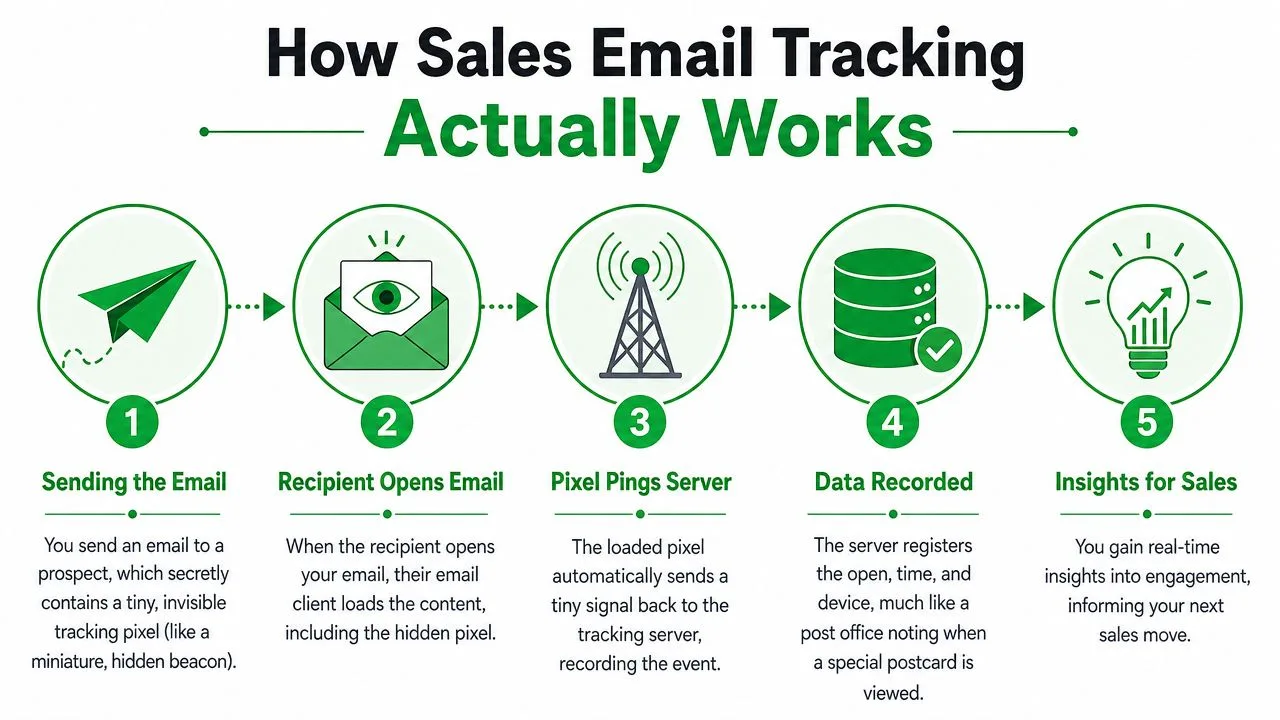
The five-step flow inside a tracked email
Here’s what happens behind the scenes:
- You send the email. The message includes a tiny invisible pixel in the body.
- The recipient opens it. Their email client renders the message and attempts to load images.
- The pixel loads from a server. That request acts as the open signal.
- The system logs the event. The open timestamp is recorded, and many tools also note device type.
- You see the result. That can show up as a notification, a status mark, or thread-level detail in your inbox.
None of this means the tool “reads” the email the way a person does. It’s event tracking, not mind reading.
What the mechanism does and does not do
Tracking can tell you that an image load happened. It can’t tell you whether the recipient read every line, agreed with the message, or had buying authority. That’s an important limit.
A good rep treats an open as a signal of activity, not proof of persuasion.
An open means the door may have moved. It doesn’t mean the deal did.
That distinction is why experienced teams pair email tracking with context from the thread itself. Was the subject line strong? Did the message contain a real next step? Was there a reason to click, reply, or forward it internally? The pixel can only surface the event. Your process has to turn that event into judgment.
Key Tracking Metrics and What They Really Mean
Once tracking is live, the raw data starts coming in. That’s where many reps make their first mistake. They see “opened” and assume “interested.” In practice, each metric carries a different level of confidence, and some have gotten weaker over time.
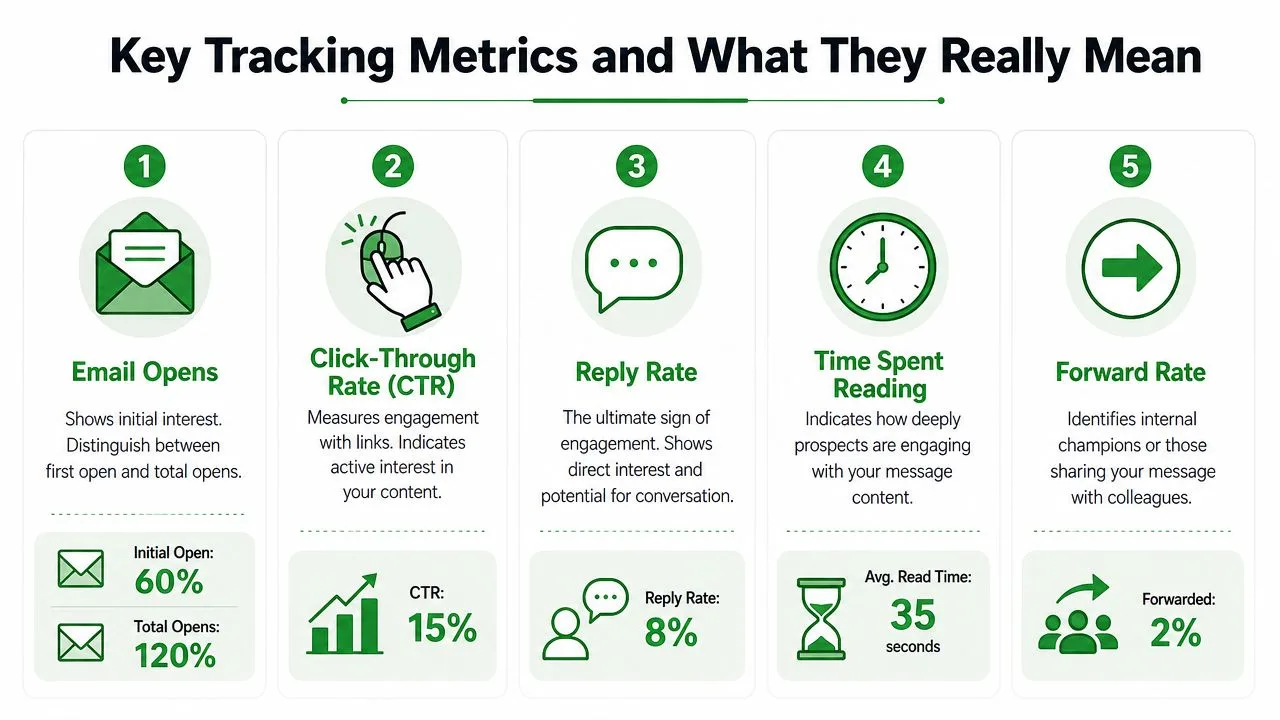
Opens are useful, but they’re no longer clean
An open still tells you something. It can show whether the email was likely surfaced, whether timing mattered, and whether a thread became active again. The problem is accuracy.
Apple’s Mail Privacy Protection compromises open tracking by pre-loading images from remote servers, which can artificially inflate open rates by an estimated 20 to 30 percent in iOS environments and push teams toward secondary metrics like click-through rates (Omeda on how MPP affects email tracking).
That means a rep who treats every open as human attention can easily misread the situation. A “fresh open” may not reflect a real read at that moment.
Which signals deserve more weight
If I’m coaching a rep, I rank metrics roughly like this:
- Replies: The cleanest signal. A buyer invested effort to respond.
- Clicks: Better than opens because they require an active choice.
- Repeated opens in a short window: Not perfect, but often more meaningful than a single open.
- Open timestamps and device context: Useful for timing, weaker for intent on their own.
A broader KPI framework also helps when you’re reviewing outreach quality across campaigns, not just one thread. Clepher’s guide to email KPIs is a useful reference if you want a structured view of what to watch beyond a simple open count. For a closer look at how teams often overread this one metric, see Mailtrack’s piece on email open rates.
How to read patterns without overreacting
A single open should rarely trigger an aggressive move. It’s often just a cue to keep the prospect in your active queue.
Three patterns are more actionable:
| Signal pattern | What it may suggest | Better move |
|---|---|---|
| One open, no click | Email was surfaced, interest unclear | Wait, then send a value-based follow-up |
| Multiple opens on the same thread | Internal review or renewed attention | Follow up with a specific next step |
| Click without reply | Active evaluation, but not enough conviction yet | Respond with clarifying help, not pressure |
The main point is simple. Opens are directional. Clicks and replies are stronger. Patterns beat isolated events.
Implementing Tracking in Gmail with Mail Tracker for Gmail
If your team runs on Gmail, the easiest setup is the one that stays inside Gmail. Reps don’t adopt workflow-heavy tools consistently. They adopt tools that show up where they already send, read, and reply.
Mail Tracker for Gmail is one example of that approach. It installs through the Google Workspace Marketplace or as a Chrome extension, then adds tracking details directly in Gmail instead of forcing reps into a separate dashboard. You can read more about the setup model in this overview of email tracking for Gmail.
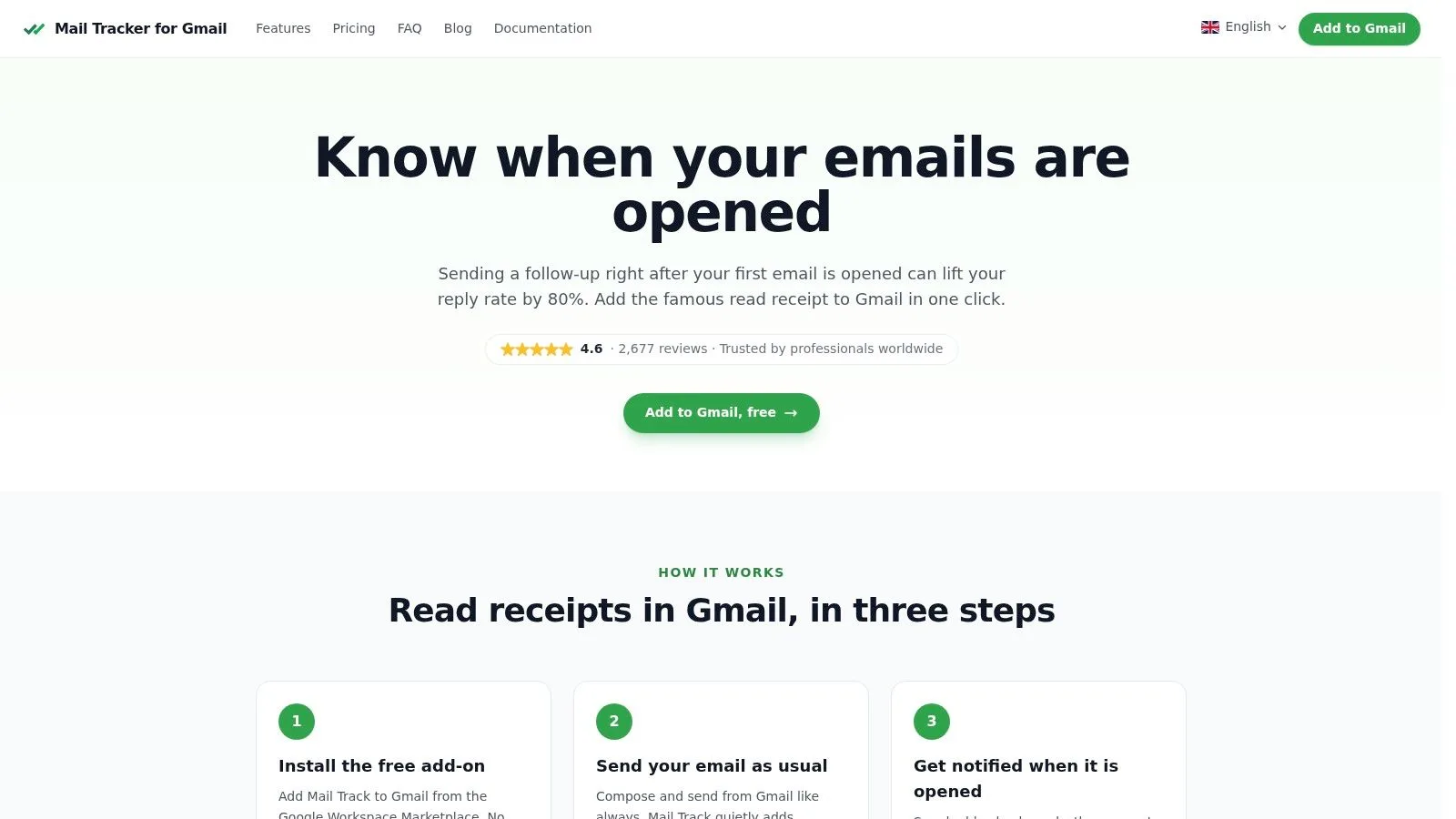
What setup should feel like in practice
For a sales rep, implementation should be boring. That’s a good thing. You want the tool to disappear into the workflow.
A typical Gmail setup looks like this:
- Install the add-on or extension.
- Authorize the account.
- Compose as usual in Gmail.
- Enable tracking on the message.
- Watch status signals appear in the sent thread and inbox.
The best versions of this experience don’t ask the rep to remember a new routine. They make send-time tracking and post-send visibility part of the inbox.
What to look for inside the inbox
The practical benefit of a Gmail-native tracker isn’t technical sophistication. It’s speed of interpretation. If a rep can glance at a thread and see status indicators, open timestamps, or open counts, they can make a better decision in the moment.
That matters most in active pipeline work, where timing is often the difference between a useful follow-up and an annoying one.
A short walkthrough helps if you want to see the inbox experience before rolling it out:
What to evaluate before standardizing a tool
Don’t pick a tracker just because it shows opens. Check for the things that affect rep adoption:
- Native Gmail visibility: Reps should see status without leaving the inbox.
- Notification control: Alerts are useful only if they’re timely and not noisy.
- Mobile continuity: Managers and reps often need signals away from the desk.
- Policy fit: The tool should support the privacy stance your company wants to take.
If those pieces aren’t there, the technology may work, but the team probably won’t.
Best Practices for Timely and Effective Follow-Ups
Tracking data matters only if it changes behavior. Otherwise it’s just another stream of activity to glance at and ignore.
The strongest teams use sales email tracking to improve two things: follow-up timing and follow-up relevance. Timing answers when to act. Relevance answers what to say next.
Start with intent, not motion
A rep who calls every time an email registers an open usually burns trust fast. A rep who waits for stronger signs often gets better conversations. The distinction is important because advanced systems don’t stop at basic opens.
Advanced tracking systems use link-rewriting and integrate with CRM platforms to append granular data points such as reply rates, meeting conversion rates, and cumulative click engagement to lead records, turning passive tracking into actionable sales intelligence (Gain on email tracking and CRM workflows).
That’s the level where tracking becomes useful for revenue work. You stop asking, “Did they open?” and start asking, “What did they engage with, and what should that change in my next touch?”
Use signals to pick the right follow-up lane
When I coach reps, I usually frame follow-up decisions in lanes rather than scripts. The lane depends on the strongest recent signal:
- Low-signal lane: One open and nothing else. Keep the next message light and useful.
- Warm-signal lane: Multiple opens or return activity. Ask for a concrete next step.
- High-signal lane: Clicks, attachment engagement, or a reply. Move toward a meeting or decision point.
If your team is trying to tighten process earlier in the funnel, this guide on streamlining lead capture emails is a useful companion read because it focuses on how automation and message sequencing can support response quality without making outreach feel robotic. For practical message ideas after a quiet thread, Mailtrack’s examples for a follow-up email after no response are worth keeping handy.
The best follow-up doesn’t mention that you tracked the email. It uses the signal privately to choose better timing and better wording.
Templates for Acting on Tracking Signals
| Tracking Signal | Interpretation | Recommended Action & Template |
|---|---|---|
| Single open | Message likely surfaced, but intent is weak | Action: Wait before pressing. Template: “Wanted to resurface this in case it got buried. The main point is [value statement]. If this is relevant, I can send a short summary or a few times to talk.” |
| Multiple opens in a short window | Prospect may be revisiting the email or sharing it internally | Action: Offer clarity and momentum. Template: “Circling back with one simple next step. If it helps, I can walk you through the proposal and answer any questions live this week.” |
| Link click on pricing or case material | Buyer is evaluating specifics | Action: Address decision criteria. Template: “I saw there may be interest in the details, so I’m sending the short version. The biggest things teams usually want to clarify are rollout, pricing structure, and fit. Happy to cover those directly.” |
| Attachment engagement without reply | The content is relevant, but the buyer may be stalled | Action: Reduce friction. Template: “If reviewing the deck raised any questions, I can save you time with a quick recommendation based on your current setup. Want me to send that over?” |
| Reply plus click activity | Strong engagement and active consideration | Action: Move to a meeting or commitment. Template: “Thanks for the reply. Based on what you shared, the fastest next step is a short working session so we can confirm fit and map out next steps.” |
Timing rules that usually hold up
A few habits make tracking data more useful:
- Respond to clusters, not blips. Repeated engagement is usually more meaningful than a lone event.
- Match the follow-up to the content consumed. If they clicked pricing, don’t send a generic bump.
- Log the pattern in the CRM. A signal only helps long-term if the account team can see it later.
- Use tracking to improve copy. If opens happen but clicks never do, the body and CTA likely need work.
That’s how tracking moves from interesting to operational.
Common Sales Email Tracking Pitfalls to Avoid
The fastest way to misuse sales email tracking is to assume the software knows more than it does. It doesn’t. It reports signals. You still have to interpret them.
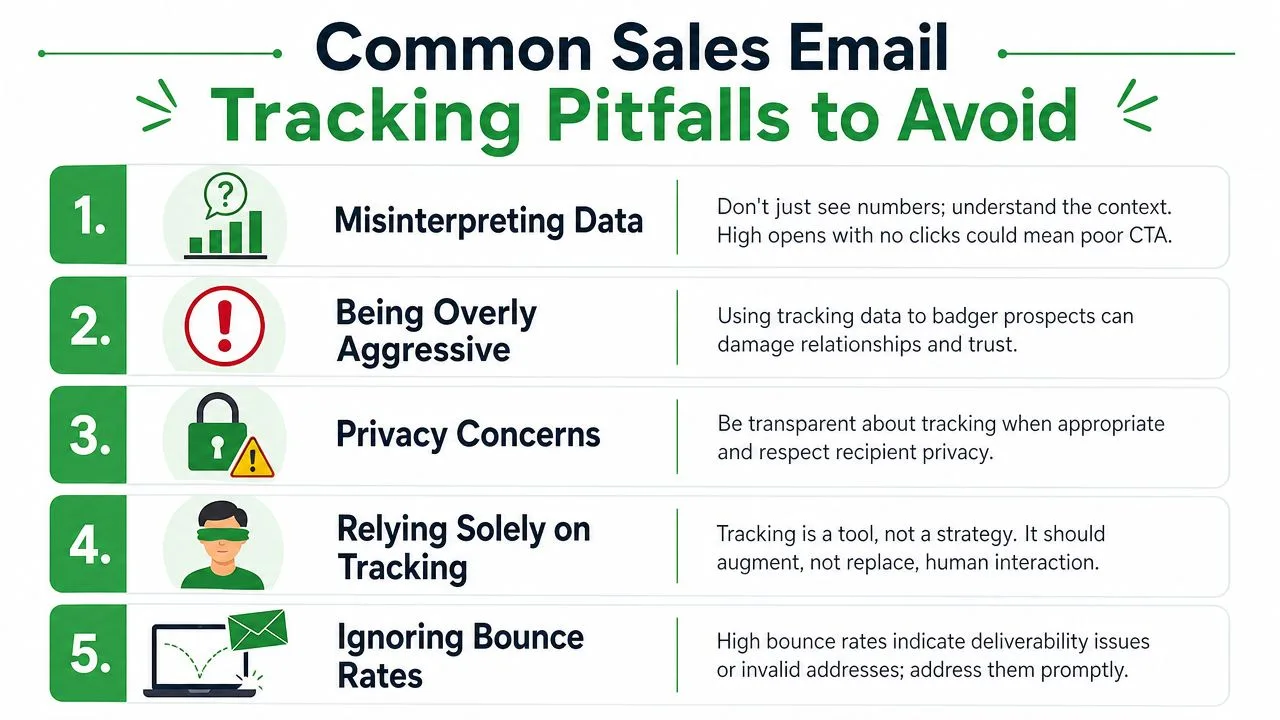
The biggest mistake is overvaluing opens
The core gap in modern tracking is the gap between open tracking and actual engagement. Open rates have become less reliable because privacy tools interfere with the signal, which is why many teams now shift toward engagement scoring that gives more weight to clicks, attachment views, and reply rates than opens (discussion of open-rate reliability and engagement scoring).
That change matters because it corrects bad behavior. Reps who chase every open often end up calling too soon, sounding invasive, or spending time on false positives.
Other habits that quietly hurt results
A few patterns show up again and again:
- Treating one open as urgency: A prospect may have skimmed the message, previewed it, or triggered an event without real attention.
- Ignoring thread context: A tracked event means less if the message itself had no clear CTA.
- Using tracking only for timing: The same data can help diagnose weak subject lines, weak offers, or unclear asks.
- Forgetting the human side: Buyers don’t want to feel monitored. They want relevant communication.
If the follow-up would sound strange without the tracking signal, rewrite it.
A better operating model
A smarter model is simple. Let opens influence queue priority. Let clicks influence relevance. Let replies drive action. That’s a healthier scoring logic than treating every metric as equal.
Tracking should make a rep more thoughtful, not more aggressive.
Navigating Privacy and Compliance in 2026
Tracking isn’t only a workflow question. It’s a trust question.
Recipients don’t experience invisible tracking as a neutral technical feature. Some ignore it. Some expect it. Some see it as surveillance if the seller uses the data clumsily. Good teams account for that reaction before they roll out tools and templates.
What privacy-first tracking actually means
One useful baseline is understanding the scope of the data involved. The tracking mechanism does not require permission to read or manage email content, subject lines, or recipients. It records the timestamp of opens and device type, preserving privacy by avoiding access to message content (Hunter Help Center on what its tracker accesses).
That doesn’t remove every compliance obligation, but it does help teams separate event tracking from content access. Those are not the same thing.
Transparency is usually the safer long-term choice
In practice, privacy and performance aren’t opposites. Teams that set clearer internal rules usually avoid the creepy use cases that make reps sound like they’re watching buyers in real time.
A few policy choices help:
- Define acceptable use: Reps should know when tracking informs timing and when it shouldn’t trigger outreach.
- Align with regional requirements: Legal review matters, especially for teams selling across markets with stricter consent expectations.
- Choose tools with clean data boundaries: Look for products that are explicit about what they do and don’t access.
- Audit your broader stack: If your sales workflow includes internal automation or custom scripts, the same discipline should apply to code quality and data handling. For teams reviewing operational risk, an AI code security audit can be a useful reference point for how to assess systems that touch sensitive workflows.
The best ethical standard is easy to remember. Use tracking to improve service to the buyer, not to pressure the buyer.
If you want read receipts and open notifications inside Gmail without adding a separate workflow, Mail Tracker for Gmail is a straightforward option to evaluate. It adds tracking indicators in the Gmail interface, supports real-time open notifications, and fits teams that want visibility on sent emails while keeping the process inside the inbox.
Ready to track your emails?
Add Mail Track for Gmail from the Google Workspace Marketplace and know the moment your emails are opened. Free and unlimited.
Add to GmailMore reading
More from Tutorials
How to Track Link Clicks in Gmail (and What a Click Really Tells You)
Learn how to track link clicks in Gmail, why Gmail does not do it natively, how tracked links work and how to read clicks without being fooled by scanners.

How to Find My Contacts in Gmail: A Practical Guide
Learn how to find my contacts in Gmail on desktop and mobile. Clear steps for Google Contacts, search tips, shortcuts, and contact details from emails.

Objection in Sales Explained and How to Handle It
Learn what objection in sales really means, why it happens, and proven frameworks to handle price, timing and trust objections with confidence.