
Sales Productivity Software: A Practical Buyer's Guide
Discover how sales productivity software speeds follow-ups and pipelines. Learn core features, selection criteria, and how Gmail-native tools like Mail Tracker
Sales productivity software cuts admin time and tightens follow-up timing, and the highest-impact feature for most Gmail-based reps is real-time open tracking that turns an open event into a same-day action. AI tools now save sellers an average of 4.8 hours per week, while AI usage among sales reps rose from 24% in 2023 to 43% in 2024, according to Autobound’s 2026 sales prospecting summary.
A rep can write a thoughtful proposal at 9:00 a.m., attend meetings, and look at a silent inbox at 11:40 a.m. The prospect may have opened the message, shared it internally, or reread the pricing paragraph, but the rep has no useful signal and waits until tomorrow to follow up. That delay is where many otherwise solid sales workflows lose momentum.
The practical answer isn’t another giant dashboard. For a Gmail-based team, it’s an inbox-native layer that connects recipient behavior to a human next step. This guide covers the features that matter, Gmail workflows, selection criteria, privacy checks, and a 90-day rollout built for small revenue teams.
What Sales Productivity Software Actually Does for You
Sales productivity software is the layer that cuts administrative work and tightens the timing between prospect activity and seller action. It can automate contact management, sequencing, reminders, engagement tracking, drafting, and reporting, but those capabilities don’t have equal value. The useful question is whether the software helps a rep act while a prospect is engaged.
A rep staring at an empty inbox doesn’t need more activity for its own sake. They need to know which thread deserves attention, what changed, and what action should happen next. A read event can turn an unqualified follow-up task into a timely, relevant response, especially when the rep can see the original message and context without leaving Gmail.
Practical rule: Buy software that shortens the distance between a prospect signal and a specific seller action.
The strongest workflows follow a simple chain:
- Capture behavior: Record an open, click, reply, or other engagement event.
- Surface priority: Put that signal where the rep already works, rather than hiding it in a separate reporting system.
- Prompt judgment: Give the rep enough context to decide whether to reply, call, send a useful asset, or wait.
- Measure the outcome: Track whether faster action produces better conversations, not merely more notifications.
This distinction matters because automation can increase task volume without improving selling. Bain’s analysis of AI and sales productivity describes sales as a comparatively new frontier for generative AI, so buyers should judge tools by downstream conversion and follow-up quality rather than by the number of automated functions.
The best setup for a small Gmail team is usually compact: Gmail, a lightweight CRM, a tracker or sequencing layer, and clear operating rules. The software should remove logging and timing friction while leaving the rep responsible for relevance, judgment, and tone.
How Sales Productivity Software Became an Inbox-Native Layer
Sales productivity software has moved through three practical stages. Cloud CRM first solved storage and visibility. Salesforce’s 1999 launch marked a major moment in modern cloud CRM history by changing how teams stored customer data and managed pipelines, as described in Ambition’s history of sales tools.
Sequencers then addressed volume. They gave reps repeatable cadences, scheduled touches, and fewer forgotten tasks. Enablement software expanded during the same period, helping teams organize content and support seller execution.
The current wave focuses on timing and context. A 2026 industry summary reports that 81% of sales teams are experimenting with or have fully implemented AI, up from roughly half two years earlier. AI-assisted workflows now support prospecting, follow-up, and forecasting (Autobound). The category is shifting from a database that records what happened to an operating layer that helps a rep choose the next action.
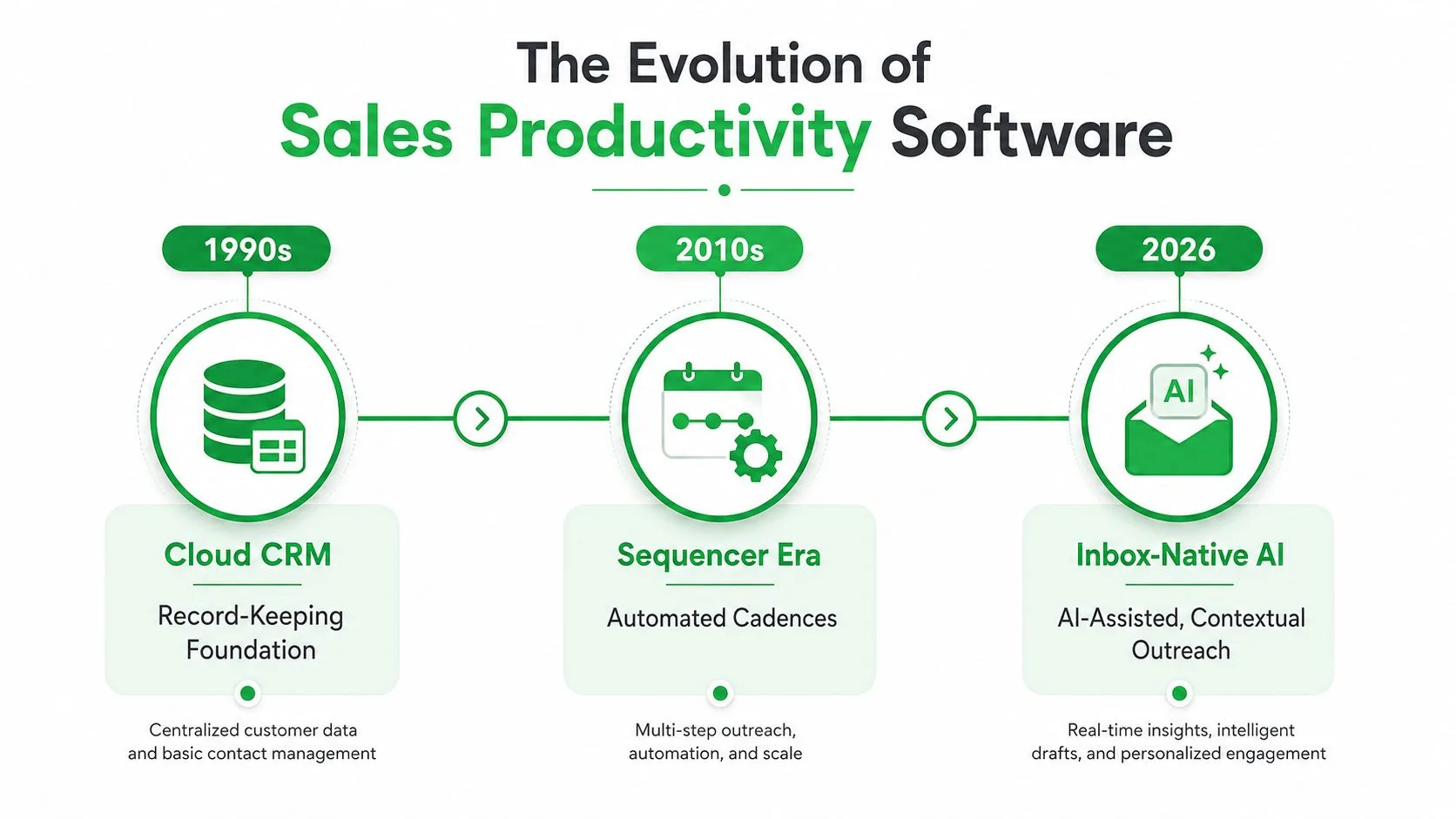
That progression makes the inbox-native layer especially useful for small Gmail teams. A large sales suite can handle territories, forecasting, and orchestration. A Gmail-based rep often loses time after a prospect opens an email, before anyone takes the next human action. The CRM stores the account. The sequencer schedules a touch. The inbox layer shows that the prospect is active now.
For this operating model, the main bottleneck is often the gap between meaningful engagement and a relevant response. Mail Tracker for Gmail fits that gap by keeping the signal close to the thread where the rep must decide what to do. A tool that works inside Gmail can shorten that interval without forcing a small team to rebuild its entire sales process.
Core Features and Metrics That Move Reply Rates
Feature lists hide the buying decision. Rank sales productivity software by the behavior it changes, not by how many panels appear in the interface.
Real-time open and click telemetry comes first. It can move the open-to-reply rate and median time to first follow-up by telling a rep when a message has active attention. Message-level timestamps and notifications are more useful than an end-of-day digest because the rep can respond while the thread is still relevant. For outbound teams, use a spam trigger words checker before launching messages, since deliverability affects whether engagement data is meaningful at all.
Multi-step sequences come next. Sequencing affects weekly touches per rep and reduces forgotten follow-ups, but it shouldn’t become an excuse for indiscriminate messaging. Benchmarks covering 16.5 million cold emails across 93 domains reported a peak reply rate of 8.4% for a single-email touch, with performance declining across additional follow-ups (Benchmark Email). That finding supports deliberate cadence design, pacing, and deliverability safeguards.
AI drafting and reply classification can improve pipeline velocity when they reduce research and sorting without replacing seller judgment. AI should identify intent, summarize a thread, and suggest a grounded response. It shouldn’t generate generic personalization that makes every message sound automated.
Mobile parity affects whether a rep can act away from a desk. Published mobile-email statistics report phone checking among 68% of users in the United States, 65% in Japan, and 70% in the United Arab Emirates, with higher reported shares in several other markets (ExpertBeacon’s mobile email statistics). Real-time mobile alerts matter when the first response window occurs during travel, meetings, or field work.
Tight Gmail or Outlook integration is the operating requirement. If a rep must copy an email into another tab, the signal arrives after the moment has passed. A useful email metrics dashboard guide should help teams connect engagement events to action rather than celebrate opens in isolation.
| Feature | Primary Metric Moved | Leverage for Gmail Reps |
|---|---|---|
| Real-time open and click telemetry | Open-to-reply rate, median time to first follow-up | Very high |
| Multi-step sequences | Weekly touches per rep | High, if cadence is controlled |
| AI drafting and reply classification | Pipeline velocity | Medium to high |
| Mobile parity | Meetings booked per 100 opens | High for mobile teams |
| Gmail or Outlook integration | Follow-up speed and data completeness | Very high |
Skip leaderboard dashboards unless managers can show the behavior they change. A colorful ranking rarely fixes weak messaging, poor timing, or bad targeting.
Real-World Scenarios and a Mail Tracker for Gmail Walkthrough
An SDR has sent three useful messages to an enterprise buyer and the thread has gone quiet. The buyer opens the original business-case email late in the morning. Instead of sending another generic “just checking in” note, the SDR replies with a concise reference to the implementation concern discussed in that message.
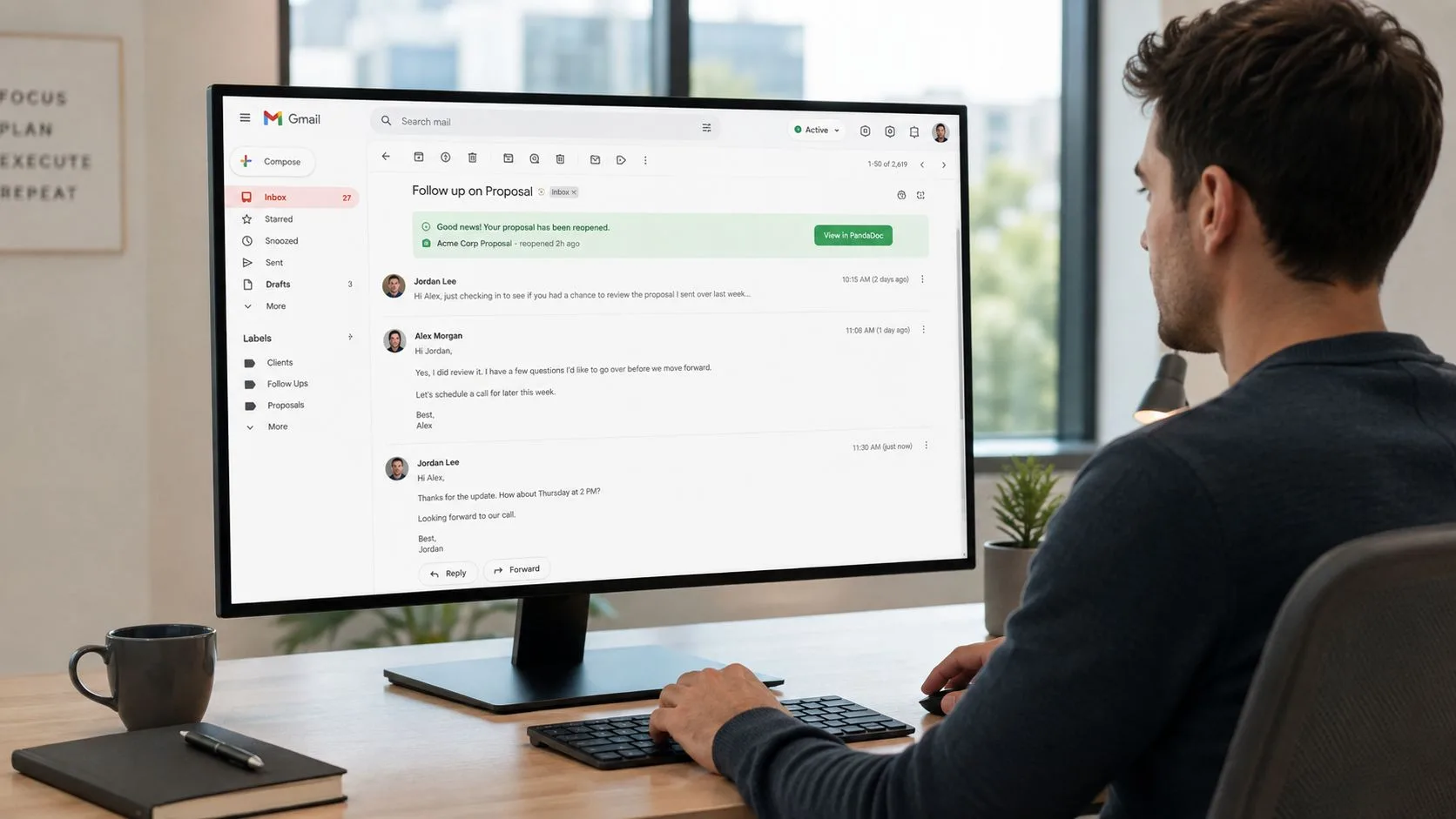
An AE sees a champion reopen a proposal while the AE is reviewing pipeline. That event doesn’t prove buying intent, but it gives the AE a reason to inspect the thread, check whether the champion likely revisited pricing or scope, and send a useful clarification rather than waiting for a scheduled task.
A founder notices an inbound demo request while already in a meeting. A mobile alert makes the request visible, and the founder can respond soon after the meeting with a specific scheduling option. The value isn’t surveillance. It’s preventing an interested contact from becoming an ignored thread.
A Gmail-native walkthrough
The workflow is straightforward:
- Install the extension from the Google Workspace Marketplace.
- Compose normally in Gmail, without moving the conversation into a separate sales application.
- Watch for the double-check mark when the prospect opens the tracked message.
- Review the message-level timing and the relevant line in the email.
- Send a same-hour follow-up that adds context, answers a likely question, or proposes a next step.
Mail Tracker for Gmail provides read receipts, open counts, timestamps, and real-time notifications inside Gmail, including support for sending tracked emails and receiving alerts on mobile. That gives the rep a behavioral cue without requiring a new workspace.
A typical manual process creates a response gap of a day or two. The inbox-native pattern is tighter: open event, relevance cue, timely reply within four hours. The event alone isn’t the strategy. The rep still needs to write something worth answering.
The short video below shows how this type of Gmail workflow fits into day-to-day outreach.
A Selection Framework for Gmail-Based Revenue Teams
You can score a candidate in under thirty minutes by testing four axes. Don’t begin with the feature page. Begin with the rep’s actual Gmail routine.
Workflow fit
Does the product live inside Gmail, or does it force the rep into a separate tab? Test composing, checking engagement, receiving alerts, and reviewing history. Every context switch creates an opportunity for the rep to postpone the next action.
Signal quality
Ask whether opens appear in real time, whether notifications identify the message, and whether the tool distinguishes useful events from noisy or aggregated reporting. A delayed summary may be adequate for broad campaign analysis, but it isn’t enough when the goal is fast human follow-up.
Cost transparency
Check the billing unit. Flat per-seat pricing is easier to forecast than credits that apply to tracked events, AI generations, contacts, or sequence executions. Read the limits on contact storage, history, automation, and feature access before approving a rollout.
Privacy posture
Require written answers about GDPR and CCPA responsibilities, data residency, tracking controls, and what happens when a recipient opts out. GDPR gives individuals eight core rights over personal data, including access, rectification, erasure, restriction of processing, portability, objection, information, and protection from certain automated decision-making or profiling (European Commission guidance).
| Criterion | Mail Tracker for Gmail | Mid-Market Sales Suite | AI Sequencer |
|---|---|---|---|
| Workflow fit | Embedded in Gmail | Usually spans CRM and separate workspace | Often centered on sequence workspace |
| Signal quality | Read receipts, open counts, timestamps, and alerts inside Gmail | Broader account and engagement reporting | Cadence and engagement signals across sequences |
| Cost transparency | Check plan limits and tracking options | Review seat, module, and integration charges | Review seats, AI credits, and execution limits |
| Privacy posture | Review documented tracking controls and user rights | Review vendor, CRM, and integration policies | Review AI processing, tracking, and residency terms |
Use the sales outreach tools comparison to expand the shortlist, then test each candidate with real Gmail messages. Choose the tool whose weakest axis still fits your operating model.
Why Fewer Tools Often Beat a Stacked Sales Stack
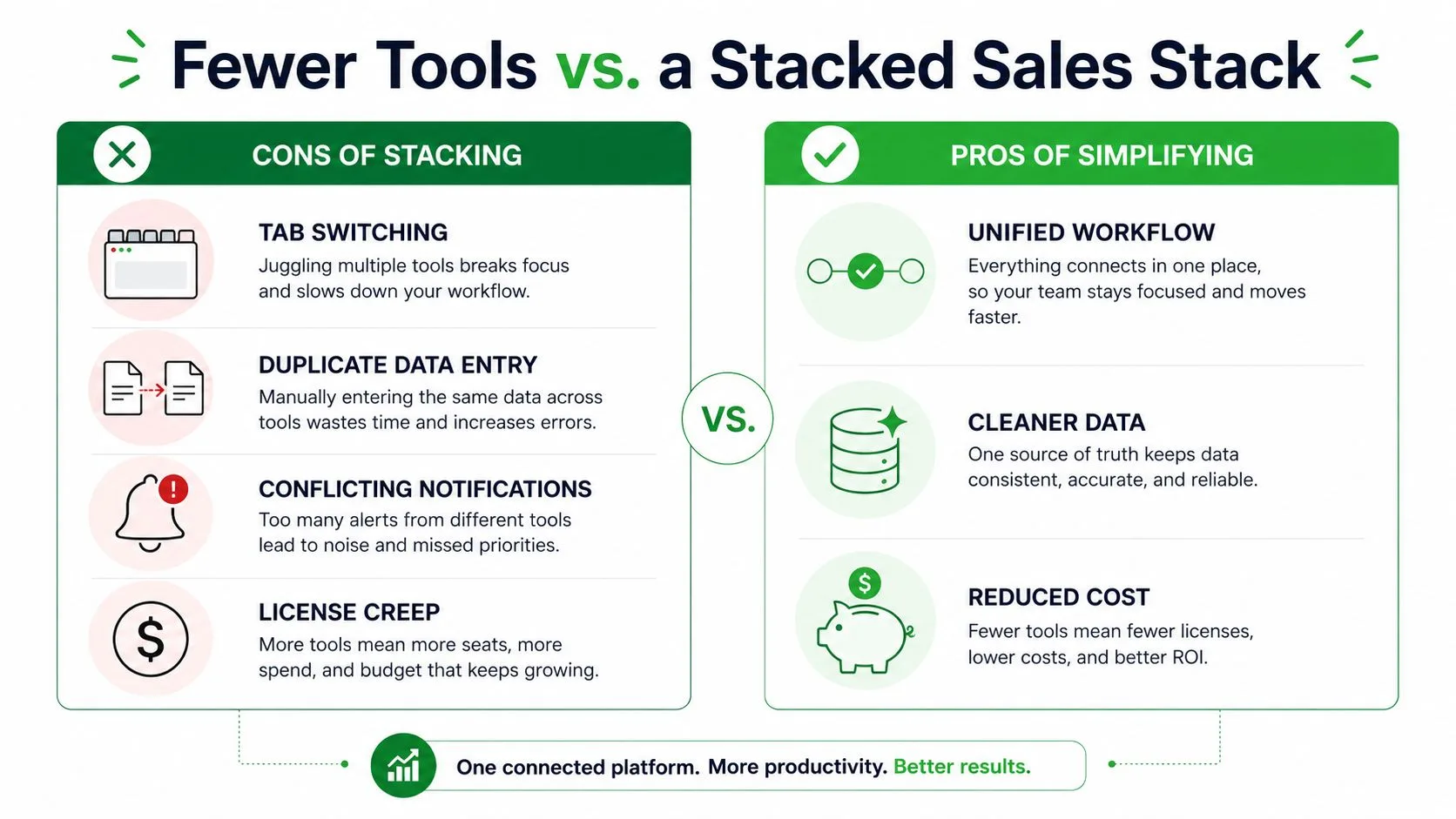
Adding software doesn’t automatically add selling time. A rep who switches between Gmail, a sequencer, a CRM, a notification hub, and an analytics dashboard may spend more effort maintaining the system than acting on buyer behavior.
The hidden tax appears in familiar forms:
- Tab switching: The rep leaves the inbox to find a signal, then loses the thread’s context.
- Duplicate data entry: Activity gets logged in more than one place, or not at all.
- Conflicting notifications: Several tools alert the rep about the same prospect with different timing.
- License creep: The team pays for overlapping capabilities that no one fully adopts.
The better design is a single source of truth for customer records, with a lightweight inbox-native layer responsible for engagement timing. Let Gmail handle the conversation, let the CRM hold durable opportunity data, and give one tracker ownership of the open signal. That division keeps each tool focused.
Five tools don’t create five times the output. They often create five places where a rep can lose the next action.
I wouldn’t claim a fixed time saving for every team. The result depends on the number of users, the amount of overlap, and whether managers enforce one workflow. The test is simple: inventory every task a redundant product owns, remove it for a controlled group, and compare logging completeness, follow-up latency, and reply quality.
Ask one question before buying another platform: which existing tool can own one more job without losing focus? If Gmail already contains the message, context, and reply action, an inbox-native tracker may be more practical than a separate engagement suite.
The broader market is moving toward tech-stack consolidation, CRM integration, mobile workflows, and AI-assisted personalization, while Microsoft folded Copilot for Sales into Microsoft 365 Copilot in October 2025, as summarized in Martal’s sales automation coverage. That direction reinforces a useful operating principle for small teams: integrate around the workflow your reps already use.
Pricing, Privacy, and Your First 90 Days
Pricing usually appears in three shapes. Free tiers may cap tracked activity, such as Mail Tracker for Gmail’s free 100 monthly events, while per-seat subscriptions create a predictable cost that can grow with headcount. Usage-based AI add-ons charge for tracked events, generated content, or AI credits, which can make a low entry price less predictable as adoption expands.
Check the limits that sales pages tend to place below the headline price:
- Contact storage: Confirm whether saved contacts and history are limited.
- Sequence execution: Look for caps on active workflows, sends, or follow-up steps.
- Feature gates: Verify whether mobile alerts, invisible tracking, reports, or message-level history require a paid plan.
- Retention rules: Ask how long open-event logs remain available after a contact unsubscribes.
Gmail’s native read receipts don’t solve this problem for every sender. Google says they’re available only for work or school accounts, not personal @gmail.com accounts, and recipients may need to approve a receipt before it’s sent; when approved, Gmail shows the time and date the message was opened (Google’s Gmail read receipt documentation). A dedicated tracker can offer different workflow controls, but the sender still needs a lawful and transparent process.
Review GDPR email compliance guidance with counsel or your privacy lead. Establish consent and disclosure requirements, decide whether tracking pixels can be disabled for particular recipients, document data residency, and define footer language that fits your outreach and applicable rules. Don’t treat an open event as consent or as proof of intent.
Days 1 through 30
Install the Gmail extension, connect the right accounts, configure desktop and mobile notifications, and define who may track messages. Train reps to use an open alert as a prompt to inspect context, not as permission to send irrelevant follow-ups.
Days 31 through 60
Baseline reply rate, open-to-reply rate, meetings booked per 100 opens, and median time to first follow-up. Review a sample of messages each week to see whether faster responses are also more relevant. If notifications create noise, narrow the tracked prospect list and adjust alert rules.
Days 61 through 90
Consolidate overlapping CRM, sequencing, and reporting functions. Keep the system that gives reps reliable signals with the fewest context switches. Document ownership for activity logging, opt-outs, retention, and manager review before expanding beyond the pilot.
Pick one Gmail-native tool, run a 30-day pilot on a controlled prospect list, and measure the follow-up-to-reply gap before adding anything else.
Mail Tracker for Gmail adds read receipts, real-time open notifications, double-check marks, open counts, and message timestamps directly to Gmail across web and mobile workflows. Visit Mail Tracker for Gmail to test an inbox-native approach, then measure whether faster, more relevant follow-up improves your team’s conversations before expanding the stack.
Ready to track your emails?
Add Mail Track for Gmail from the Google Workspace Marketplace and know the moment your emails are opened. Free and unlimited.
Add to GmailMore reading
More from Guides

How Accurate Is Email Tracking? What Opens Really Tell You
How accurate is email tracking in Gmail? Learn why opens get overcounted or missed, how to spot false opens, and which signals to trust before you follow up.

Email Tracking Pixel: How It Works, How to Spot One and Where It Falls Short
What is an email tracking pixel, how does it show an open in Gmail, how can you find one, and why Gmail and Apple Mail proxies limit what it can tell you.

7 Example Email Accept Job Offer Templates
Use these 7 example email accept job offer templates for formal, concise, and enthusiastic replies, with subject lines, clauses, and sending tips.